About this app
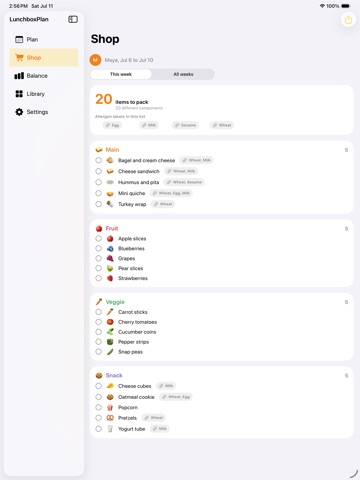
Pack a week of school lunches without the daily scramble. LunchboxPlan lets you plan Monday to Friday for each kid, balance every box across the four food groups, and turn the whole week into one shopping list. Build a box and LunchboxPlan shows you at a glance what is there and what is missing: a main, a fruit, a veggie, and a snack. Set each kid's likes, dislikes, and allergy labels once, and the builder floats the foods they love, hides the ones they will not touch, and flags any allergen you have marked. What you can do: - Plan a weekly lunch board for each kid, Monday through Friday. - Balance every box across four food groups, with a clear hint for the group you still need. - Keep kid profiles with likes, dislikes, and your own allergy labels. - Get one consolidated shopping list from the week, de-duplicated and counted. - Build a library of go-to components and let favorites and use counts drive a repeat-winner rotation. - See how the week balances with simple charts: coverage per day, balanced days by week, and your most-used foods. - Export the shopping list as a CSV and the week plan as a printable PDF. - Syncs across iPhone, iPad, and Mac with iCloud. Free and Pro: - Free plans one kid and one week, with the full box builder, the library, and the shopping list. - Pro unlocks unlimited kids, every week with full history, and CSV and PDF export. Pricing: Pro is $3.99 USD per month, $24.99 USD per year, or a one-time $59.99 USD lifetime unlock. Prices in other regions are shown in your local currency at purchase. Your data stays yours. Everything is stored on your device and in your private iCloud, synced with Apple's CloudKit. There are no accounts, no ads, and no tracking. LunchboxPlan Pro subscriptions renew automatically unless canceled at least 24 hours before the end of the current period. Payment is charged to your Apple Account. Manage or cancel anytime in Settings. Privacy Policy: https://innovalabworks.com/privacy Terms of Use (EULA): https://www.apple.com/legal/internet-services/itunes/dev/stdeula/
Audience growth
Ratings growth
Baseline captured. Growth appears after the crawler observes a changed rating count.
Momentum comes from crawler snapshots for the tracked storefront. “Viral growth signal” means unusually fast recent rating gains; it is an indicator, not download data.
Price tracking
Price intelligence
First snapshot captured. The trend line starts after the next crawler price observation.
- First observed Aug 19, 2026 · 3:17 PM Free
Screenshots