About this app
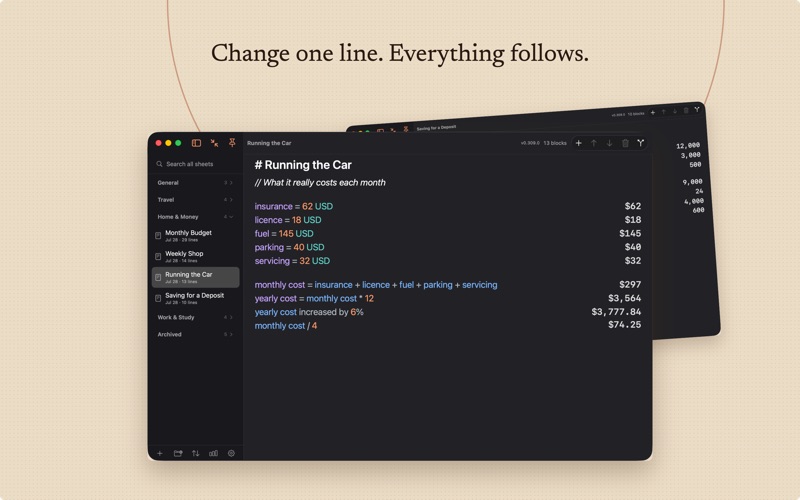
Magic Notes works out sums written as ordinary sentences, and refuses, out loud, the ones it cannot answer exactly. Write a line the way you would say it. Put "monthly budget = 1450" at the top and "monthly budget - rent" underneath, and the answers appear in a column of their own beside your words, updating as you type. There is no equals key, and nothing has to be copied back out. WHY A REFUSAL IS THE POINT Most calculators round quietly and hand you back something that looks exact. This one keeps only the values it can represent exactly. Where a result can only be approximate it is marked with an approximation sign and held to the number of decimal places you set, and a line that asks for six decimal places still wins on its own. Where a line cannot be answered honestly at all, it is refused where you wrote it, with the reason and a hint you can open beside it. You never walk away holding a number that is wrong and looks right. WHAT YOU CAN WRITE Plain sentences rather than a calculator syntax. Percentages and sales tax, money, units and units you define yourself, cooking measures, dates and durations, time arithmetic, loans and compound interest, rates such as an amount per week, powers and roots, rounding, factors and combinations, number bases, conditions, and statistics over the lines above. Give a figure a name at the top and call it by that name below. Total a section. Tag a line and total the tag. Change one figure and the whole page follows. The built-in guide, What Can I Write?, holds 765 worked examples in twenty categories. Filter it, press Insert, and the line drops into your sheet. Every example is run against the real engine before release, so the guide can never teach you a form the app does not have. MONEY THAT NAMES ITS SOURCE Exchange rates are yours to enter, each stamped with the date it was true, and every conversion names the exact snapshot it used. Nothing is downloaded, filled in or estimated on your behalf, so a figure you put in front of someone else is one you can account for. A NOTEBOOK YOU KEEP Sheets stack up in folders, pinned where you want them and sorted in plain words rather than jargon. Search the whole library at once. Preview a find and replace before it happens. Duplicate a sheet to start from. Send finished work to the archive. Undo and redo run deep, every sheet keeps a revision timeline, and a backup is restored under a guard that checks before it replaces anything. Take the work elsewhere: plain text, Markdown, print, PDF, or a portable bundle of the entire library. An import shows you what will change before it changes it. QUIET BY DESIGN Zen mode clears the window down to your own lines. Shortcuts actions drop text into a sheet, open a sheet, or search the library from elsewhere on your Mac. An explanation panel, off unless you ask for it, shows how the selected line was read. Spotlight indexing stays off until you switch it on, and covers only sheet titles and the text you wrote, on this Mac. Statistics count what you have actually done: lines written and answered, the kinds of line you use, your streak, and a hundred named ranks to climb if that appeals to you. NOT ONE BYTE LEAVES THIS MAC No account, no sign-in, no sync, no cloud, no analytics, no tracking, no advertising. The app makes no network requests at all: it does not need the internet to do its job, so it does not use one. Your notebooks sit on your own disk, and support is answered personally, usually within two to three business days. Requires macOS 15 or later.
Audience growth
Ratings growth
Baseline captured. Growth appears after the crawler observes a changed rating count.
Momentum comes from crawler snapshots for the tracked storefront. “Viral growth signal” means unusually fast recent rating gains; it is an indicator, not download data.
Price tracking
Price intelligence
First snapshot captured. The trend line starts after the next crawler price observation.
- First observed Aug 17, 2026 · 11:35 AM Free
Screenshots