About this app
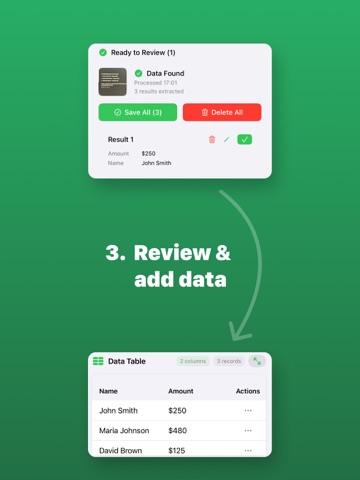
Turn any photo or document into structured data with the power of AI. Magic Table is more than just a document scanner or image scanner - it's an AI scanner that transforms photos, receipts, and forms into clear spreadsheets. No more manual typing: simply scan documents or snap a photo, and the app instantly converts them into organized tables. Create Your Own Tables You are in control of your data. Define custom fields that match your workflow - customer names, invoice numbers, product codes, or research notes. Whether you perform a quick document scan or capture multiple receipts, Magic Table intelligently maps everything into rows and columns. AI-Powered Data Extraction Our advanced neural networks don't just do image to text - they understand the structure of tables, forms, and lists. Every receipt scanner result is clean, structured, and ready to use. Magic Table eliminates copy-paste errors and gives you accurate data in seconds. Manage and Edit with Ease View your results in a familiar spreadsheet layout. Make quick edits, adjust rows or columns, remove duplicates, or add new entries. Everything stays neat and accessible, just like in Excel (yes, even catching users who search for "exel"). Export Anywhere Your data belongs to you. Export results in structured formats - CSV or JSON - for instant reporting or sharing. Need to convert a PDF to CSV? Magic Table makes it effortless. Send files by email, AirDrop, or save directly to iCloud Drive, Dropbox, or Google Drive. Who Needs Magic Table? • Business professionals: digitize contracts, receipts, and invoices with a fast receipt scanner. • Students: capture textbook tables, lecture notes, and research data without retyping. • Researchers: organize scanned archives into spreadsheets. • Administrators: streamline office work with fast document scans. • Finance teams: manage bills and receipts by exporting them to CSV. • Healthcare professionals: process medical forms and lab results. • Everyday users: keep expenses, collections, or notes neatly organized. Why Choose Magic Table? • Save hours of manual work with instant AI extraction. • Eliminate mistakes from manual data entry. • Customize the structure of your tables before scanning. • Export clean, structured data ready for spreadsheet tools. • Use one app for all your document and data needs. Download Magic Table today and experience how effortless data entry can be. Take a picture, let AI analyze it, and get structured information in seconds - ready for Excel, CSV, or JSON. Terms of use: https://www.apple.com/legal/internet-services/itunes/dev/stdeula/
Audience growth
Ratings growth
Baseline captured. Growth appears after the crawler observes a changed rating count.
Momentum comes from crawler snapshots for the tracked storefront. “Viral growth signal” means unusually fast recent rating gains; it is an indicator, not download data.
Price tracking
Price intelligence
First snapshot captured. The trend line starts after the next crawler price observation.
- First observed Aug 13, 2026 · 10:37 AM Free
Screenshots