About this app
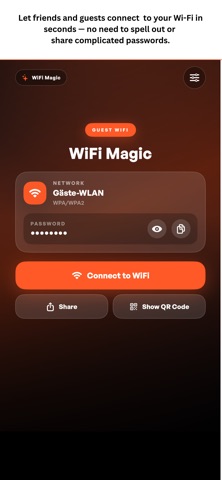
MagicPoster brings digital Friend Books, shared Photo Books, and Wi-Fi guest experiences together in one app. Create projects directly in the app and optionally connect them to MagicPoster, MagicTag, or GPlate products using NFC and QR codes. Friend Book Create a digital Friend Book with your own questions. Guests can contribute photos, answers, and personal messages through a link, QR code, NFC tag, or App Clip without creating an account. Photo Book Collect photos, videos, audio messages, titles, and captions in one shared album. Choose the capacity that fits your event and manage every contribution from the app. WiFi Magic Create a permanent Wi-Fi guest page, share the network using a QR code or NFC tag, and keep the same link when network details change. Optional Premium features add custom links, files, and guest-page content. MagicPoster and GPlate products Link compatible physical products to an existing project or configure a new experience after scanning them. Permanent links keep connected QR codes and NFC tags usable when project details change. Manage your projects - Create and edit Friend Books, Photo Books, and Wi-Fi pages - Save project QR codes as images - Review, report, block, or remove guest contributions - Restore eligible purchases across devices - Connect compatible MagicPoster, MagicTag, and GPlate products - Share permanent project links, QR codes, and NFC destinations The app can be used without purchasing a physical product. Guests can use public project experiences without installing the full app. Some features and capacities require an in-app purchase or subscription. Terms of Use (EULA): https://www.apple.com/legal/internet-services/itunes/dev/stdeula/
Latest release
What’s New
New native App Clip experiences let guests open and contribute to Friend Books and Photo Books, connect to Wi-Fi, and view Premium WiFi pages without installing the full app. MagicTag setup now hands off securely to the full iOS app.
Audience growth
Ratings growth
Baseline captured. Growth appears after the crawler observes a changed rating count.
Momentum comes from crawler snapshots for the tracked storefront. “Viral growth signal” means unusually fast recent rating gains; it is an indicator, not download data.
Price tracking
Price intelligence
First snapshot captured. The trend line starts after the next crawler price observation.
- First observed Sep 12, 2026 · 12:34 AM Free
Screenshots