About this app
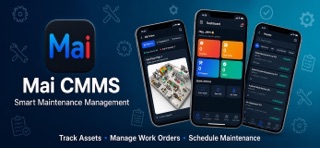
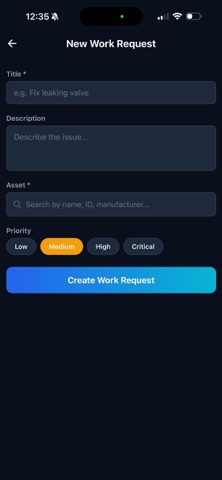
Mai Tech Mobile is the powerful companion app for the Mai CMMS platform, built for maintenance technicians and facility managers who need to stay productive on the go. - New: Unlock the app with Face ID or Touch ID - New: Sign in with Apple and Google - New: In-app Help & FAQ and Contact Support - New: Guided walkthrough for first-time users - New: Landscape and tablet support - Improved branding, stability, and translations WORK ORDER MANAGEMENT • View, update, and complete work orders from your phone • Real-time status tracking with priority indicators • Add notes, photos, and time logs directly from the field • Follow step-by-step procedure checklists • Track parts usage and labor hours ASSET MANAGEMENT • Browse your complete asset inventory with photos • View asset details, maintenance history, and health scores • Scan QR codes for instant asset lookup • Monitor equipment status at a glance PARTS INVENTORY • Search and browse parts with real-time stock levels • Low stock alerts and reorder notifications • View parts diagrams with interactive markers • Track parts usage across work orders MAI VIEW — INTERACTIVE FACILITY MAPS • Navigate floor plans and parts diagrams with pinch-to-zoom • See asset locations with status-coded markers • Identify critical maintenance areas instantly • View overlay diagrams for complex equipment ASK MAI — AI-POWERED ASSISTANT • Get instant answers about maintenance procedures • AI-powered troubleshooting support • Quick access from any screen TECHNICIAN DASHBOARD • Personal performance stats and time tracking • Daily timeline with shift coverage analysis • Work order completion metrics • Parts cost tracking NOTIFICATIONS • Real-time push notifications for new assignments • Priority alerts for critical work orders • Stay connected with your maintenance team MULTI-LANGUAGE SUPPORT • Available in English, Spanish, French, and Portuguese • Automatic language detection Mai Tech Mobile requires a Mai CMMS account. Visit maicmms.com to learn more about the Mai CMMS platform.
Latest release
What’s New
This update delivers performance improvements, stability fixes, and refinements across work orders, assets, and parts management for a smoother, faster experience.
Audience growth
Ratings growth
Baseline captured. Growth appears after the crawler observes a changed rating count.
Momentum comes from crawler snapshots for the tracked storefront. “Viral growth signal” means unusually fast recent rating gains; it is an indicator, not download data.
Price tracking
Price intelligence
First snapshot captured. The trend line starts after the next crawler price observation.
- First observed Aug 19, 2026 · 3:17 PM Free
Screenshots