About this app
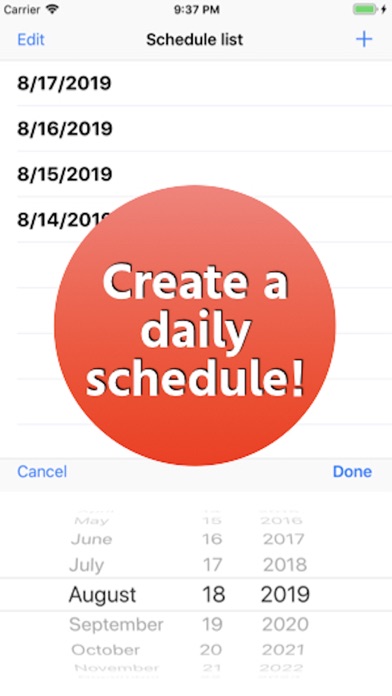
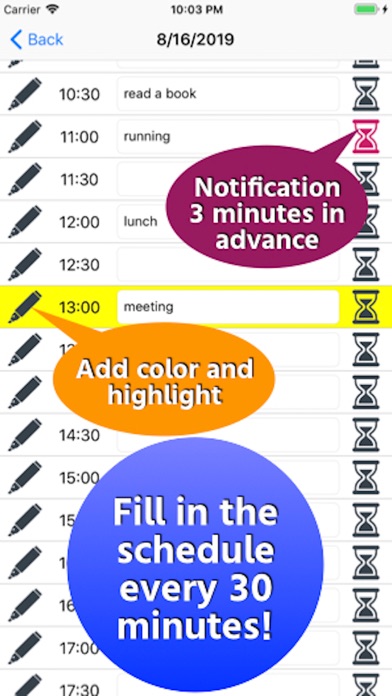
Please follow the link in the "Tools" button. [How to use] ・ After launching the app, select the date to schedule from the “+” button on the top right. ・ When a date is added to the list, tap the date and enter the schedule in the specified time field in steps of 30 minutes. ・ Tap the pen icon on the left to add color. ・ Tap the hourglass icon at the right end to receive notification to your smartphone 3 minutes before that time. * If you do not receive a notification, go to “Notification”-> “Manage events in a list” from the setting application and set “Allow notification”. Please contact the review section or DM here. https://twitter.com/corasck
Latest release
What’s New
- Improved the wording of the dialog. - In addition, the internal processing has been improved.
Audience growth
Ratings growth
Baseline captured. Growth appears after the crawler observes a changed rating count.
Momentum comes from crawler snapshots for the tracked storefront. “Viral growth signal” means unusually fast recent rating gains; it is an indicator, not download data.
Price tracking
Price intelligence
- First observed Aug 15, 2026 · 1:20 PM Free
Screenshots