About this app
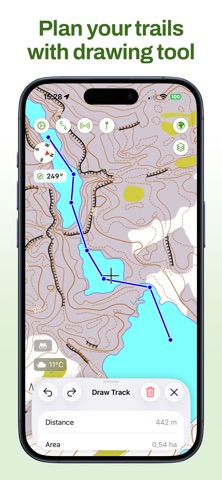
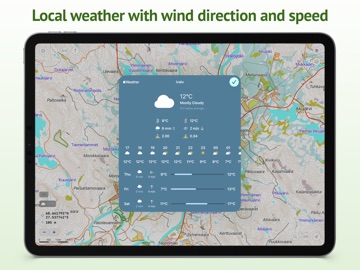
Maptrails is a modern map browser that packs an amazing experience for hiking, hunting, orienteering, or just enjoying your time outdoors. Only Maptrails offers full featured apps for iPhone, iPad, Apple Watch and Mac. The app comes preconfigured with a large selection of built-in maps in topographic, nautical, and aerial imagery styles. Save places as map markers that sync between your devices over iCloud. It is easy and fun to measure distances and draw paths on the map, or use Look Around to see street level imagery at any address. Maptrails Pro one-time purchase unlocks a professional grade feature set. Add your own maps and data layers from standard APIs, and bring in GeoJSON, GPX, IMG, KML or Shapefile data. You can even draw notes directly on the map using touch or pencil! Maptrails makes it easy to plan your upcoming hike by letting you download map tiles for offline use, view up-to-date weather forecasts, or draw tracks on the map and save them to GPX files. During your hike, record the route to a GPX track or workout in Health app, and graph out its speed and altitude data. For hunters, integration with Oma Riista lets you import hunting areas using area code. Share your current GPS location with a private group of other Maptrails users. Build your own dog tracker by installing separate Beacon app to another device and pairing it with Maptrails. Its position can then be tracked on the map in Maptrails. Maptrails Pro one-time purchase unlocks full functionality • Use folders to organize tracks and markers • Attach images to markers from photo library • Track other devices with Beacon app installed • Import hunting areas from Oma Riista service • Get weather forecast for targeted location • Draw notes on map using touch or pencil • Import tile maps from web using browser • Download map areas for offline use • Share your GPS location with groups • Draw tracks on map and save as GPX files • Import GPX files and view them on map • View workout routes from Health app • Record workouts and export to GPX • Add Vector Tile, Tile Map, WMTS and WMS maps • Add GeoJSON, GPX, IMG, KML and Shapefile map layers • Get new features in future versions If some map available via open data APIs is not yet included, or you want to make your maps available in Maptrails, please email me at feedback@freshbits.fi. Also follow on Instagram at @KartastoApp. This app has been built by one developer as a hobby project during many evenings and weekends. Please be nice and take this into account when giving feedback. Icon symbol credit to Wolf Böse (Creative Commons).
Latest release
What’s New
• Adds attachments to markers: photos, PDFs and other files, synced between all devices using iCloud Drive. • Allows changing symbol of every marker in a folder at once. • Long press on the map on Apple Watch to navigate to that spot, with a line, a bearing and a distance. • Improved GPX track recording status on Apple Watch that you can drag to the size you want. • Fixes asking permission for heart rate data on Apple Watch. • Various bug fixes and improvements.
Audience growth
Ratings growth
Baseline captured. Growth appears after the crawler observes a changed rating count.
Momentum comes from crawler snapshots for the tracked storefront. “Viral growth signal” means unusually fast recent rating gains; it is an indicator, not download data.
Price tracking
Price intelligence
First snapshot captured. The trend line starts after the next crawler price observation.
- First observed Aug 24, 2026 · 1:22 PM Free
Screenshots