About this app
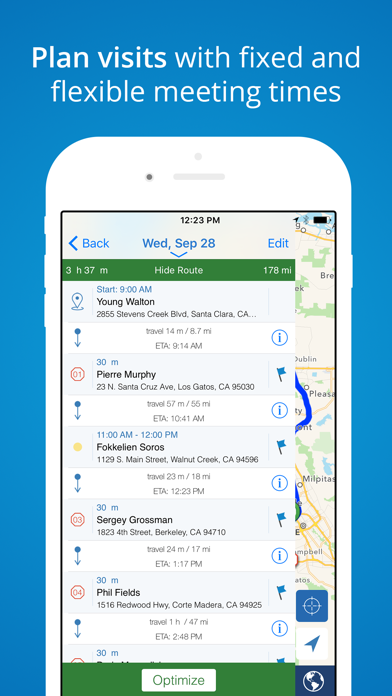
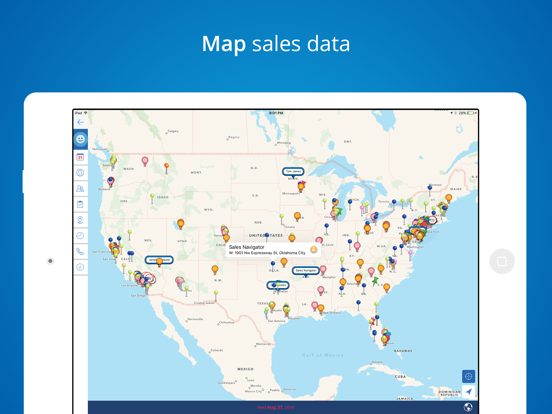
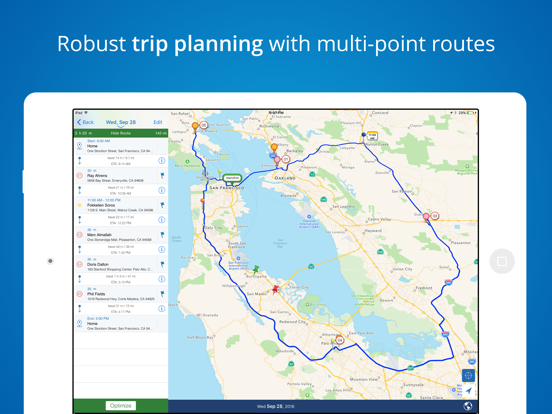
Field sales and service reps use Mapview to visualize their data geographically and to plan the best route for their customer visits. Mapview enables you to efficiently manage your territory with easy-to-use mapping and planning tools. Improve trip planning by viewing your appointments and drop-in visits as a route, while easily visualizing other contacts along the way. Once downloaded, enjoy a free 30 day trial. Our individual use Pro Plan includes unlimited contact mapping and your choice of payment frequency: Monthly ($11.99/mo), Quarterly ($29.99/quarter), or Annually ($95.99/year). Mapview’s contact mapping software helps outside sales and service reps perfect their scheduling, route planning, and sales call process. - Seamlessly integrates with Contacts, Calendar & Map apps - Easily import spreadsheets of data creating automatic groups from custom field columns. - Plan daily routes with drop-in visits and calendar appointments. Easily respond to schedule changes on the go. - Use route optimization to organize trips by time or distance. - Visualize your territory and travel routes to help locate opportunities along the way. - Use different pin styles to prioritize and organize accounts into groups. Target specific customers and prospects by filtering groups on the map. - Manage sales or service territory by sending emails, taking notes and setting up meetings in Mapview. - Log activities such as contact notes, phone calls, emails, and events - most logged automatically for you so you can spend more time selling or servicing. - Utilize Mapview offline by accessing saved info, routes, directions & target map area. - Individual users can export contact data, groups, and activities to a CSV file for easy reporting. Features: - Excel spreadsheet import easily adds contacts or any location-specific data (CSV file) - Selectively import external contact groups (Exchange, iCloud, etc.) from your device's address book - Tap and hold on map to create a contact, appointment, or task - Pick from over 100 unique pins or create your own - Create custom groups to organize/prioritize data - Use multi-criteria group filtering to include or exclude data from the map - Utilize Advanced Search to select records based on a field value - Set follow up tasks with priority and status - Schedule appointments - View multiple calendars and up to 3 months of appointments at a time on the map. - Appointments sync to external calendars (ex. iCloud, Gmail, Exchange) linked to your device - Use addresses or lat/long coordinates for mapping - View ETA, distance, travel time & directions en-route - Color-coded routes show on-time or late status - Use radial search to filter contacts by proximity to a location and sort contacts by distance - Log notes using speech to text capabilities Manage your territory’s funnel and exceed your quota with this easy to use sales mapping and productivity tool. Automatic Renewal Feature: Your payment will be charged to your iTunes Account at confirmation of purchase. Your subscription automatically renews unless you turn off auto-renew at least 24 hours before the end of the current period. Your account will be charged for renewal within 24 hours prior to the end of the current period with the cost listed. You can manage your subscription and you may turn your auto-renewal off by logging into your iTunes Account Settings after purchase. No cancellation of the current subscription is allowed during the active subscription period. Privacy Policy: www.mapview.com/privacy-policy/ Terms of Use: www.mapview.com/terms-conditions/
Latest release
What’s New
Call Directory — know who’s calling Build a Call Directory from your Mapview custom groups so incoming calls from saved contacts show the contact name on your iPhone—just like a contact in your address book. • Turn on Mapview under iPhone Settings → Phone → Call Blocking & Identification • Open Settings → Call Directory in Mapview • Select one or more custom groups and tap Build • See how many eligible contacts each group includes before you build To avoid duplicate or conflicting caller labels, contacts imported from your iPhone’s address book are excluded—Mapview only identifies numbers you manage in the app.
Audience growth
Ratings growth
Momentum comes from crawler snapshots for the tracked storefront. “Viral growth signal” means unusually fast recent rating gains; it is an indicator, not download data.
Price tracking
Price intelligence
- First observed Aug 16, 2026 · 10:57 PM Free
Screenshots