About this app
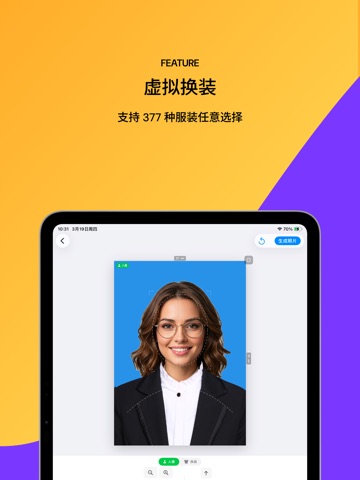
Make an ID-style photo without uploading it. Take or import a picture directly, then choose a passport, visa, resume, exam, or common ID-photo preset in the editor. The selected preset controls the crop, framing guide, processing mode, and export dimensions. PRIVACY BY DEFAULT • Photos and face measurements stay on your device • No account or sign-in • No advertising or analytics SDK • No tracking permission SAFER OFFICIAL-DOCUMENT MODE Passport, visa, identity, licence, and residence presets use original-only mode. Background replacement, beauty filters, and outfit tools are disabled. You can crop, position, rotate, check framing, and open linked official guidance where available. EDITABLE PHOTO MODE For resume, school, exam, and general ID-style photos where editing is allowed: • On-device person cutout • White, blue, red, transparent, or custom backgrounds • Manual edge cleanup • Optional appearance and outfit tools 54 PHOTO SPECIFICATIONS Presets are grouped across 18 countries and regions, including the United States, China, Japan, South Korea, the United Kingdom, Schengen, Canada, Australia, India, Brazil, Mexico, Russia, Türkiye, Thailand, Vietnam, Indonesia, and the Philippines. FRAMING CHECKS, CLEAR LIMITS Review head size, eye line, horizontal centering, tilt, and face capture quality. These checks help with composition but do not guarantee acceptance or cover every authority rule. Always follow the receiving authority’s latest instructions. EXACT OUTPUT • Exact-pixel JPEG at 92% quality • Exact-pixel lossless PNG • 2× JPEG for destinations that accept larger files • 4×6, 5×7, and A4 print sheets • AirPrint and PDF output measured by physical size FREE FOREVER No ads, subscriptions, paywalls, in-app purchases, or paid exports—now or later. Requires iOS 17 or later.
Latest release
What’s New
What's New in 1.1.6: • Added localized Home Screen quick actions to take a photo, choose from Albums, or share the app. • Expanded the app interface, permission descriptions, and App Store metadata to all 50 supported App Store languages and locales. • Improved language detection and migrated existing language choices to official locale identifiers. • Improved system integration and reliability.
Audience growth
Ratings growth
Baseline captured. Growth appears after the crawler observes a changed rating count.
Momentum comes from crawler snapshots for the tracked storefront. “Viral growth signal” means unusually fast recent rating gains; it is an indicator, not download data.
Price tracking
Price intelligence
First snapshot captured. The trend line starts after the next crawler price observation.
- First observed Aug 8, 2026 · 10:21 PM Free
Screenshots