About this app
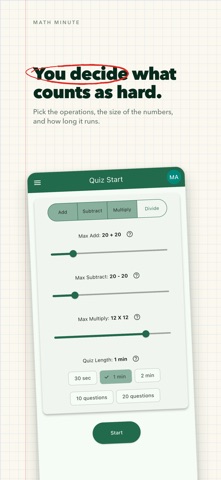
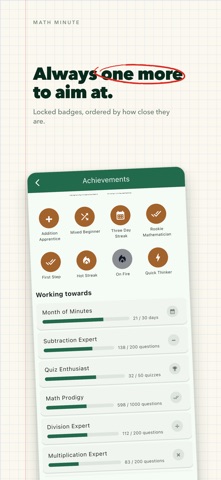
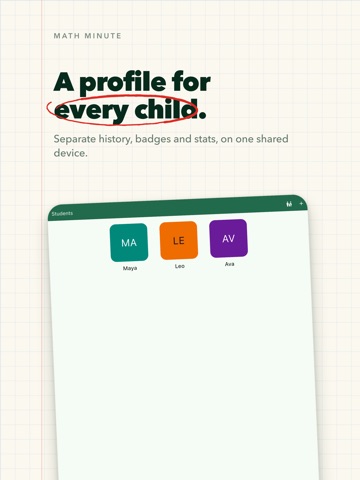
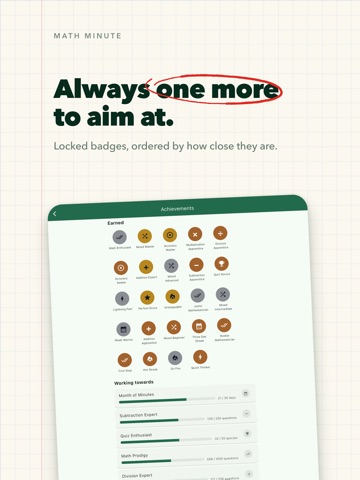
A mad minute, on the device your child already has. Sixty seconds. As many questions as they can answer. Then a result screen that shows you exactly which facts they missed - and builds a practice set out of them. WHY TIMED PRACTICE Most children learn the method years before they learn the facts. They can work out 7 x 8, but they work it out every single time. A timed drill is how that becomes recall instead of arithmetic, which is why teachers have used the mad minute for decades. Math Minute is that worksheet, marked instantly. HOW IT WORKS • Pick the operations, the size of the numbers, and how long the quiz runs • Your child answers on a big, simple numpad - no keyboard, no menus • A wrong answer shows the whole fact, so they see the right answer immediately • At the end: accuracy, questions per minute, every question, and the slowest one • "Practice now" builds a short set from the facts they just missed NOT EVERY CHILD WANTS A CLOCK Younger children often freeze against a countdown, so the untimed sets are free and always have been. A 10-question set has no timer at all. Nothing about the app pushes a child toward the clock before they're ready. BUILT FOR MORE THAN ONE CHILD Add a profile for each child, each with their own name, colour, history and badges. Everyone shares one device and nobody shares a score. WHAT THEY EARN 43 badges for streaks, speed, accuracy and simply turning up several days in a row. Once earned, a badge is never taken away - a broken streak is met with silence rather than a penalty. FREE • Addition, with numbers up to 10 • One-minute quizzes and untimed 10-question sets • A profile for every child, full quiz history and results • No ads. No accounts. No data leaves the device. PREMIUM - a single purchase, not a subscription • Subtraction, multiplication and division • Bigger numbers: up to 100 for add and subtract, 12x12 tables, division to 12 • 30-second and 2-minute quizzes, and 20-question sets • All 43 achievements, and the full stats breakdown per operation • Division questions always divide evenly, so there are never any remainders. PRIVACY There are no accounts, no ads, no analytics and no third-party tracking. Every quiz, badge and profile is stored on the device itself. The app works fully offline. Purchases are made from a Parents area, so a child cannot reach the store by tapping around. Best for ages 6-11, roughly grades 1 through 5.
Latest release
What’s New
The biggest update since launch - a year of work in one go. PRACTICE WHAT THEY MISSED The result screen now names the exact facts your child got wrong, and "Practice now" turns them into a short untimed set on the spot. Each missed fact is asked twice, topped up with fresh ones so a single slip doesn't make a two-question quiz. DIVISION, AND ROOM TO GROW INTO IT Division joins add, subtract and multiply. Questions always divide evenly, so there are never any remainders. A WRONG ANSWER NOW TEACHES Instead of just a red cross, the whole fact appears: 7 + 8 = 15 and the clock is held while it's on screen, so reading it costs no quiz time. NOT EVERY CHILD WANTS A CLOCK "10 questions" is now free and has no timer at all, so a younger child can practice without a countdown. MORE TO COME BACK FOR A live streak counter on the quiz screen. Progress bars on locked achievements, so a child can see what's nearly won. Four new badges for turning up 3, 7, 30 and 100 days running. 43 badges in total, each with its own artwork. LEAVING AND COMING BACK The back arrow asks before it ends a quiz, and keeps what was answered. Backgrounding the app freezes the clock and hands back a different question, and the result screen reports the pause honestly instead of penalising it. SOUND, AND A CHOICE ABOUT IT Answer sounds and haptics, both switchable. READS BETTER EVERYWHERE The sum scales with the screen - on a 13-inch iPad the digits are more than twice their old size. Light and dark now follow your device by default. The countdown, the app bar and the achievement list were all rewritten for readability, and the result screen leads with the score.
Audience growth
Ratings growth
Baseline captured. Growth appears after the crawler observes a changed rating count.
Momentum comes from crawler snapshots for the tracked storefront. “Viral growth signal” means unusually fast recent rating gains; it is an indicator, not download data.
Price tracking
Price intelligence
First snapshot captured. The trend line starts after the next crawler price observation.
- First observed Sep 4, 2026 · 7:23 AM Free
Screenshots