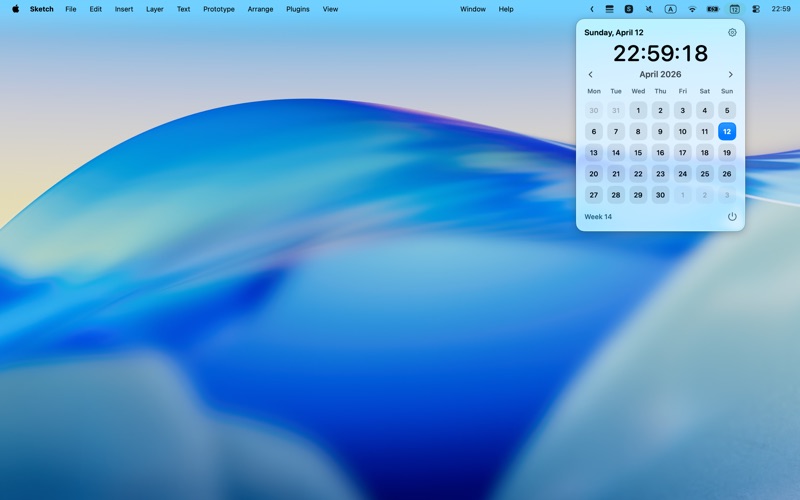
About this app
MCalendar keeps a clean, lightweight calendar in your macOS menu bar. It is built for the moments when you just want to check the date, glance at the month, or look ahead quickly without opening a full calendar app and breaking your flow. The menu bar icon shows today’s date all day, so your calendar is always within reach. Click to open a simple month view that helps you stay oriented, plan ahead, and check dates in seconds. A built-in clock, week numbers, and flexible calendar settings make it useful every day, while the minimal design stays out of your way. Whether you are checking deadlines, planning the week, or just want a faster way to see the calendar, MCalendar gives you the essentials in one click. Highlights • See today’s date directly in the menu bar • Open a full monthly calendar instantly • Check week numbers and move across months quickly • Show a live clock with optional seconds • Choose your preferred first day of the week • Launch at login for always-ready access Simple, fast, and always available when you need it.
Latest release
What’s New
Added support for showing calendar events.
Audience growth
Ratings growth
Baseline captured. Growth appears after the crawler observes a changed rating count.
Momentum comes from crawler snapshots for the tracked storefront. “Viral growth signal” means unusually fast recent rating gains; it is an indicator, not download data.
Price tracking
Price intelligence
First snapshot captured. The trend line starts after the next crawler price observation.
- First observed Aug 8, 2026 · 2:12 PM Free
Screenshots