About this app
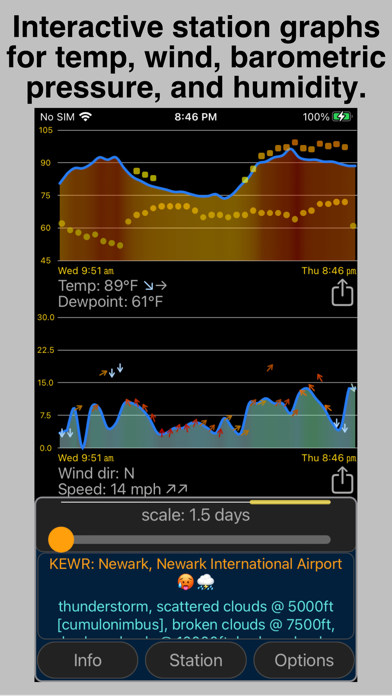
WeatheryWhere keeps you updated using weather data from a global network of thousands of weather stations - the same weather data that pilots use. With its advanced and highly customizable alerting capabilities, this app automatically checks weather conditions and forecasts in the background and alerts you based on your preferences. Is there rain on the way? Are there storm clouds nearby? Is it getting windy? Did the barometric pressure drop? WeatheryWhere automatically lets you know without you having to open an app to check. WeatheryWhere automatically uses your current location to give you weather info closest to you so you always know what’s happening wherever you are. WeatheryWhere also makes it easy to explore weather across the globe using its interactive map or to monitor the weather in the global network of thousands of weather stations. You can even see the past week’s weather conditions for any stations using the app’s beautifully-rendered graphs of baro, temp, wind speed/gust, precipitation, and humidity. The app's iPhone widget and Watch support lets you see the latest weather info and notifications at a glance. WeatheryWhere supports both iOS Lock Screen and Home Screen widgets, and the full-featured Watch app also supports a complete set of configurable complications. The Watch app can also run completely independently of your iPhone so you can stay updated. WeatheryWhere is 100% ad-free and respects your privacy. Our app does not collect any personal data and does not track you in any way. We developed WeatheryWhere because we couldn’t find a weather app that would keep us automatically updated with what was important to us. WeatheryWhere’s notifications are highly customizable with over 30 separate notification settings! Although it’s powerful enough for professionals, WeatheryWhere was designed to be easy to use for anyone looking for a different way to keep track of the weather. There’s nothing else like it and we hope you enjoy it as much as we do! Privacy policy: https://www.bogbridges.com/weatherywhere-privacy Terms of use: https://www.apple.com/legal/internet-services/itunes/dev/stdeula/
Latest release
What’s New
\This version adds a refreshed user interface including navigation bar with shortcuts. Multiple new widgets including multi-location and active alerts widgets. New notification system with highly detailed conditions and forecast settings customizable independently for each station. New notification log screen. New dynamic station map interface. Revised user station list screen displaying weather summary for each station as well as active alerts. Revised options screen with additional settings including weather symbol style and station name preference. Also includes bug fixes and performance enhancements.
Audience growth
Ratings growth
Baseline captured. Growth appears after the crawler observes a changed rating count.
Momentum comes from crawler snapshots for the tracked storefront. “Viral growth signal” means unusually fast recent rating gains; it is an indicator, not download data.
Price tracking
Price intelligence
First snapshot captured. The trend line starts after the next crawler price observation.
- First observed Aug 20, 2026 · 4:34 AM Free
Screenshots