About this app
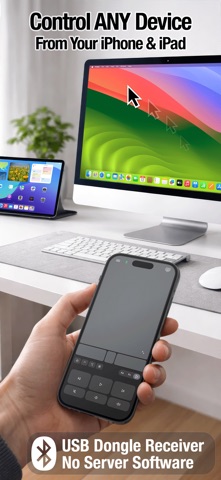
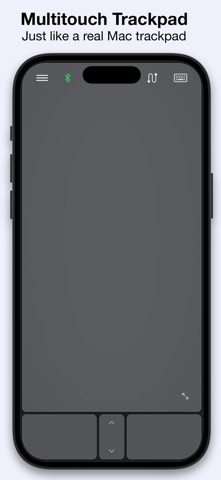
Turn your iPhone, iPad, or Apple Watch into a real USB mouse, keyboard, touchpad, and remote for any device! ** This is the USB version of Mobile Mouse, which requires the purchase of a USB-C dongle, sold separately: https://bluetooth.mobilemouse.com/dongle. (We also over versions that do not require a dongle, and work over Bluetooth or WIFI.) ** Connect instantly using native USB over Bluetooth — no Wi-Fi, no cables, and no companion software required. Once you have paired your iOS device to the dongle, it can be plugged into to any device that supports a mouse and keyboard. Unlike other remote apps that rely on Wi-Fi networks or background server software, Mobile Mouse uses a direct Bluetooth connection to our USB dongle for reliable performance anywhere — even offline. Features • Control virtually any device that supports a USB mouse and keyboard, including Windows PCs, Linux systems, Raspberry Pi, Meta Quest, ChromeOS devices, smart TVs, and more. The dongle works as a real USB device, allowing access to login screens, BIOS, and system menus without restrictions. • Multi-Device Control – Use your iPhone, iPad, or Apple Watch to control your Mac, iPad, or iPhone • Native Bluetooth over USB – No Wi-Fi, no cables, no server software to install • Multitouch Touchpad – Scroll, swipe, tap, and perform gestures smoothly • Air Mouse – Magically control your cursor by moving your iPhone in the air like a laser pointer • Media Remote – Play, pause, skip tracks, and adjust volume • Full Keyboard – Standard and function keys, modifier keys, brightness, sleep, and more. Fully encrypted • Compact Convenience – Ideal for travel, presentations, accessibility, and relaxed computing • Secure - Fully encrypted Frequently Asked Questions • Can I use my iPhone as a Bluetooth mouse? Yes. Mobile Mouse Bluetooth lets you use your iPhone as a real Bluetooth mouse for Mac and iPad. • Can I use my iPhone as a touchpad or trackpad? Yes. The app includes a multitouch touchpad with scrolling, swiping, and gesture support. • Can I use my phone as a keyboard for my Mac or iPad? Yes. Mobile Mouse provides a full Bluetooth keyboard with standard keys, function keys, and modifier keys. • Does Mobile Mouse work without Wi-Fi or internet? Yes. It connects directly using native Bluetooth over USB and works completely offline. • Is this a real USB device or just a remote app? It works as a real USB mouse, keyboard, and touchpad — not a screen-sharing or Wi-Fi remote. • Is Bluetooth input secure? Yes. All Bluetooth keyboard input is encrypted, just like a physical Bluetooth keyboard. • Does it work with Windows or Linux? Yes, it supports all operating systems and devices that can be controlled with a mouse and keybaord • Can I use it at the login screen or BIOS? Yes. With the USB dongle, Mobile Mouse works as a standard USB mouse and keyboard before the OS loads. • What are some additional uses for Mobile Mouse? Mobile Mouse works great as a presentation remote, and media controller. Works with web browsers like Safari, Chrome, and Firefox; video apps including YouTube, Netflix, VLC, Plex, Kodi, and OBS; music apps such as Spotify and Apple Music; presentation tools like Keynote, PowerPoint, and Google Slides; creative apps including Adobe Photoshop; and conferencing apps such as Zoom, Microsoft Teams, and Google Meet. Privacy Policy: https://bluetooth.mobilemouse.com/privacy Terms of Service: https://bluetooth.mobilemouse.com/terms
Latest release
What’s New
• Added Air mouse control. Move your cursor by moving your iPhone in air like a laser pointer • Fixed keyboard to prevent the first character from automatically being capital • Added Enter and Tab key to extended keyboard • Fixes
Audience growth
Ratings growth
Baseline captured. Growth appears after the crawler observes a changed rating count.
Momentum comes from crawler snapshots for the tracked storefront. “Viral growth signal” means unusually fast recent rating gains; it is an indicator, not download data.
Price tracking
Price intelligence
First snapshot captured. The trend line starts after the next crawler price observation.
- First observed Aug 14, 2026 · 12:15 AM Free
Screenshots