About this app
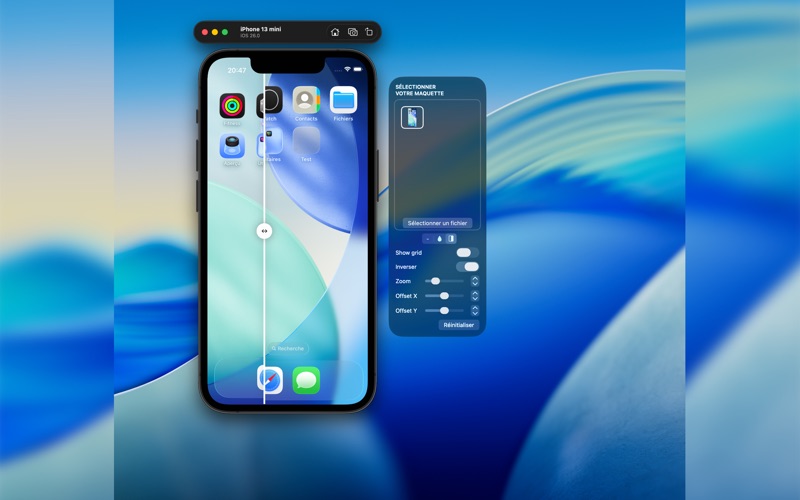
Mockalign - Increase productivity develop design faster No more headache! Unleash the full potential of your iOS app development with Mockalign, the essential toolbox for developers and UI/UX designers. Seamlessly integrating with the iOS Xcode simulator, Mockalign brings unparalleled precision to your development workflow with Figma, Sketch or Photoshop mockups, ensuring every pixel is exactly where it should be. Why Choose Mockalign? Perfect Alignment: Overlay designer mockups directly onto your simulator with mask or opacity controls. Witness pixel-perfect alignment in real-time, making adjustments a breeze. Streamlined Workflow: Situated right next to your iOS Xcode simulator, Mockalign is designed to complement your development process, not complicate it. Its intuitive interface allows for effortless mockup overlays, streamlining your workflow from concept to final product. Support for Latest Devices: Mockalign is meticulously updated to support the latest iOS devices, ensuring you're always working with the most current tech. Key Features: - Mask & Opacity Overlays: Flexibly overlay your designs with adjustable masks and opacity levels for detailed inspection and comparison. - Device-Specific Support: Tailored specifically for the most recent and popular devices, ensuring your apps look flawless on any screen. - Easy-to-Use: A straightforward, drag-and-drop interface that feels like a natural extension of your development environment. - Empower Your Development: With Mockalign, gone are the days of guesswork and constant back-and-forth with design teams. Achieve impeccable design alignment, enhance collaboration, and elevate the quality of your apps. Get Mockalign Today: Transform your development process with Mockalign - where precision meets efficiency. Download now and step into a world where your designs align perfectly, every single time. Note to Developers: We're constantly expanding our support to include more devices based on your feedback. Stay tuned for updates! Terms of use: https://www.apple.com/legal/internet-services/itunes/dev/stdeula/
Latest release
What’s New
- Add support for iPhone 13, iPhone 15 & iPhone 15 Plus - Fix some localization issues
Audience growth
Ratings growth
Baseline captured. Growth appears after the crawler observes a changed rating count.
Momentum comes from crawler snapshots for the tracked storefront. “Viral growth signal” means unusually fast recent rating gains; it is an indicator, not download data.
Price tracking
Price intelligence
First snapshot captured. The trend line starts after the next crawler price observation.
- First observed Aug 8, 2026 · 3:21 PM Free
Screenshots