About this app
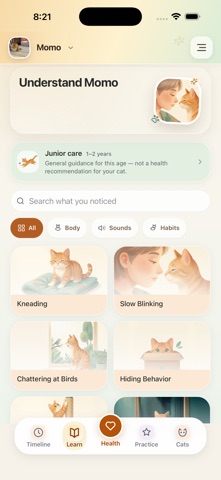
MomoMind is your cat’s health companion: a place for vet records, daily observations, care plans, and the little details that help you care for your cat. HEALTH AT A GLANCE See your selected cat’s records, weight history, upcoming care, and daily observations in one Health dashboard. Switch between cats while keeping their histories separate. VET REPORTS, ORGANIZED Import PDF reports or report photos. AI helps organize diagnoses, medicines, vaccinations, and follow-ups for you to review before saving. Keep the original files alongside the extracted details so you can check them against the source. DAILY CARE AND TIMELINE Log meals, water, litter, play, mood, medicine, and weight. Revisit entries in your cat’s timeline to see what happened and when. CARE PLANS AND REMINDERS Create a care plan manually or start from a saved vet report. Review the suggested steps and schedules, track completion, and set reminders for upcoming care. LEARN AND PRACTICE Explore lessons about cat behavior and follow gentle practice sessions that help you build everyday habits together. A PROFILE FOR EACH CAT Keep photos, profile details, care goals, and records organized for each cat in your household. Imported reports are uploaded and processed by AI. Extraction can be incomplete or inaccurate; check the original report and confirm the details before using them in a care plan. MomoMind provides educational guidance and organization tools, not veterinary diagnosis or treatment. Consult your veterinarian for health concerns and care instructions.
Latest release
What’s New
A new Health-first home for your cat’s records and everyday care. • A Health dashboard with your cat’s photo, records, weight, and upcoming care • Organized vet-report details with original files available to review • Care plans with clearer review of report-derived directions and schedules • Upload progress that reflects file transfer and AI processing • Daily observations, a per-cat timeline, and Learn and Practice tabs Review imported details against your original report before saving a care schedule.
Audience growth
Ratings growth
Baseline captured. Growth appears after the crawler observes a changed rating count.
Momentum comes from crawler snapshots for the tracked storefront. “Viral growth signal” means unusually fast recent rating gains; it is an indicator, not download data.
Price tracking
Price intelligence
First snapshot captured. The trend line starts after the next crawler price observation.
- First observed Sep 14, 2026 · 1:35 AM Free
Screenshots