About this app
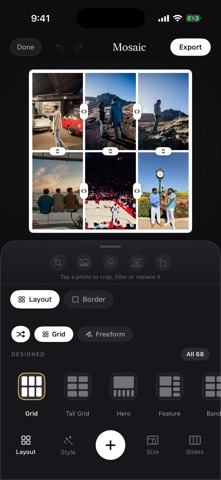
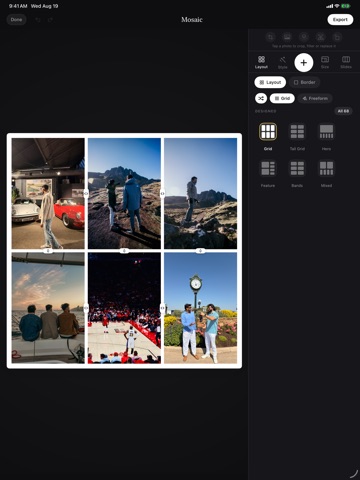
Mosaic is a photo collage maker with nothing behind a paywall. Most collage apps show you a wall of beautiful layouts and then lock the good ones. Mosaic ships every layout it has, free: over a thousand of them, including the diagonal splits, circles, arches and picture-in-picture arrangements that usually cost money. MAKE A COLLAGE IN SECONDS Pick up to 20 photos and Mosaic lays them out immediately. Tap Shuffle to re-deal until something clicks. Drag any photo onto another to swap the two. Drag the dividers to give a photo more room. THIRTEEN THEMED LOOKS One tap sets the backdrop, frames, arrangement, artwork and caption together: Summer, Coast, Postcard, Cinema, Party, Noir, Bloom, Field Notes and more. Then change anything you like. A REAL PHOTO EDITOR Zoom, crop, straighten a crooked horizon, rotate, mirror, and apply filters with adjustable strength. Lift a subject out of its background with one tap. FREEFORM SCRAPBOOKS Switch to freeform and arrange photos by hand. Scatter, stack, fan or tidy them. Dress each one in a polaroid, border, postage stamp, film strip or strips of tape. FINISH IT Add captions in twelve typefaces, from clean sans to script and handwriting. Drop in drawn stickers. Set any photo, colour, gradient or paper texture as the background. Export square, 4:5, story or any of eight sizes. YOUR PHOTOS STAY YOURS There is no account, no sign-up and no server. Mosaic has no analytics and collects nothing. Every project is saved on your device and never leaves it.
Latest release
What’s New
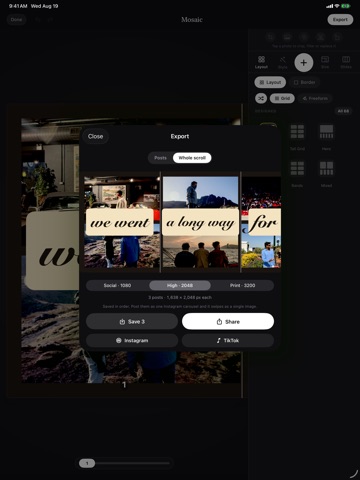
A Templates tab. Search every design by name, go straight back to the ones you used last, and keep the ones you love. 265 designs, 150 of them scrolls that swipe as one continuous picture, with new torn paper and album corner mounts. Every one of them free, as always. Stickers can be dragged out of the tray and dropped exactly where you want them, then pinched to size. Photos and cards now snap to each other and to the centre, with guides that show what you are lining up with. Dividers between photos are fixed. Dragging one could make it shake, stick, or stop responding, and pushing several around could leave photos overlapping or sliding off the edge of the collage. Handles now follow your finger exactly and stop cleanly at the edge of what fits. Export shows what you are actually posting. Swipe through your carousel post by post, exactly as a feed will show it, or switch to Whole scroll to see the whole design at once with the cuts marked. The Slides tab is now the strip itself: every post drawn end to end and numbered, and tapping one takes the canvas there. Also fixed: choosing an arrangement could clear every empty well on the canvas, the search keyboard would not close, the delete confirmation opened underneath the tab bar, and a cutout can now be undone from the card you cut.
Audience growth
Ratings growth
Baseline captured. Growth appears after the crawler observes a changed rating count.
Momentum comes from crawler snapshots for the tracked storefront. “Viral growth signal” means unusually fast recent rating gains; it is an indicator, not download data.
Price tracking
Price intelligence
First snapshot captured. The trend line starts after the next crawler price observation.
- First observed Aug 24, 2026 · 1:16 AM Free
Screenshots