About this app
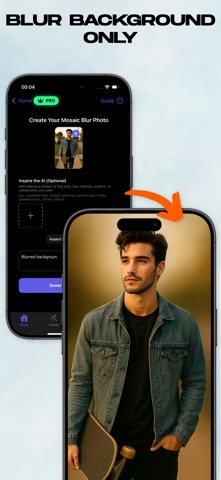
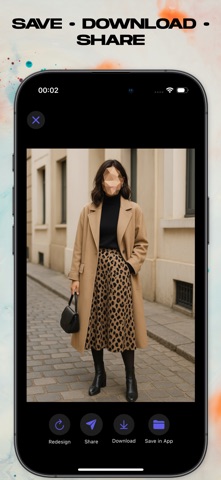
Make your photos safe to share in seconds. Mosaic Face Blur Photo Effect lets you hide sensitive details with precise, pro-level tools—perfect for social posts, marketplaces, and reports. What you can do * Hide faces or entire backgrounds with a tap * Apply pixel (mosaic), blur, or solid mask styles * Motion-aware background editing to keep subjects clear * Point, area, and shape selectors (circle, rectangle, lasso) * Intensity, size, and feather controls for every tool * Multiple regions in one photo; undo/redo anytime * Save in original resolution or HD export * Works offline, no sign-up How it works? 1. Open a photo 2. Choose Pixel, Blur, or Mask 3. Select face or background, adjust intensity 4. Save & share Why creators choose us? * Clean, fast UI designed for one-hand editing * Accurate detection plus manual fine control * Privacy-first processing on device whenever possible Use cases * Social media & vlogs * Market listings and license plates * School, work, or journalism projects Privacy No face data is retained on our servers. Face data is not shared with third parties except for processing via the AI API, which does not store face data permanently. In-App Purchases To create and save edited photos in Mosaic Face Blur Photo Effect, you must start a paid subscription (Weekly or Yearly) via in-app purchase. Terms of Use - https://www.apple.com/legal/internet-services/itunes/dev/stdeula/ Privacy Policy - https://sites.google.com/view/mosaicmox/privacy-policy
Latest release
What’s New
Fixed some bugs. Added more languages.
Audience growth
Ratings growth
Baseline captured. Growth appears after the crawler observes a changed rating count.
Momentum comes from crawler snapshots for the tracked storefront. “Viral growth signal” means unusually fast recent rating gains; it is an indicator, not download data.
Price tracking
Price intelligence
First snapshot captured. The trend line starts after the next crawler price observation.
- First observed Sep 4, 2026 · 3:11 AM Free
Screenshots