About this app
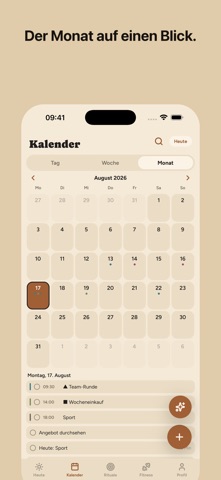
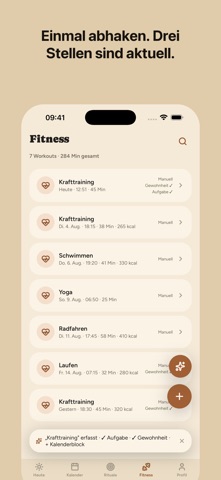
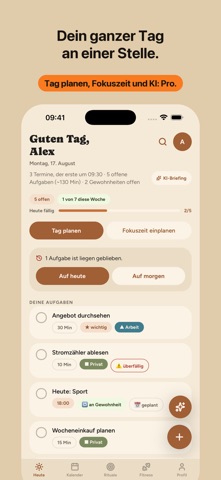
One day, one app. My Day connects tasks, calendar, habits and fitness into a single system: what you tick off in one place updates everything that belongs to it. THE CASCADE You log a workout — My Day ticks your exercise habit, completes the linked task and marks the calendar block. One tap, four places updated. And it works backwards: untick it and everything opens up again. No double bookkeeping across four apps. WHAT YOU GET • Tasks with due dates, reminders, checklists and repeats • Calendar in day, week and month — drag events and resize them • Your existing iPhone events are shown alongside, in day and week view in their own calendar's colour — so nothing gets planned into a busy hour • Habits with streaks that count honestly — a streak that ended yesterday is not reported as running • Fitness log; workouts import themselves from Apple Health if you want them to • Reminders for tasks and events, plus a morning agenda • Export and import your data as a file • Sync across your devices, German and English, eight accent colours, three backgrounds • No ads, no tracking, no analytics MY DAY PRO Pro unlocks the AI and the automatic planning. The AI actually does things instead of describing them: • "Plan my day": your open tasks that have a due date move into the free gaps of that day • Focus time: your next task due today lands in the next free slot • The assistant creates tasks, events, habits and checklists, moves things, reschedules and deletes • After every action the app re-reads the real state and reports success or failure — the assistant never claims something that did not happen • Tomorrow preview and weekly review • The stronger model, gemini-2.5-pro • 3,000 AI actions per month Also part of Pro: the home screen widget with your next event and your most important tasks. Without Pro there are no AI actions, no widget and no automatic planning. Everything under "WHAT YOU GET" is included without a subscription — and stays that way. YOUR DATA Your account and app data live with Supabase in Ireland (EU). Only when you trigger an AI action does an excerpt of your day go to Google Gemini. The app measures no usage data and no performance data, and it sends no telemetry. You can permanently delete your account and all of its data in the app itself: Profile → Danger zone → Delete account. SUBSCRIPTION My Day Pro costs EUR 9.99 per month or EUR 59.99 per year (under EUR 5 per month) and unlocks the features listed under "My Day Pro" above. Outside the eurozone Apple charges the equivalent in your local currency. There is no free trial. Payment is charged to your Apple Account at confirmation of purchase. The subscription renews automatically for the same period unless it is cancelled at least 24 hours before the end of the current period. You can manage and cancel it at any time in your Apple Account settings. Privacy Policy: https://mydayapp.app/privacy.html Terms of Use (EULA): https://www.apple.com/legal/internet-services/itunes/dev/stdeula/
Latest release
What’s New
A lot has arrived since My Day left beta. • Exercises: The library now has a search field and categories, it stays open while you build a workout, and you can add your own exercises with a free-form name. Bodyweight exercises no longer ask for a weight. • Held exercises like planks count seconds instead of reps. The fitness plan card on Today now takes you straight into the live screen. • The home screen widget is configurable: appointments, tasks or both, how many rows, and whether only today's are counted. And a Pro account no longer occasionally sees the upgrade prompt there instead of its day. • Calendar: The month panel now fits on narrow devices, the event editor shows two cards side by side, and the timeline scrolls noticeably more smoothly. • Today: The time wheel accepts taps, checked-off rows stay put, and the footer sits at the same height in all four views. The on-screen morning briefing is gone — the morning agenda notification stays, and so do tomorrow preview and weekly review. • Sync: A checkmark you set on one device now survives a device switch in the middle of a sync. "The cloud is newer" is its own visible state instead of a silent overwrite. • Profile: The assistant button no longer covers a setting. The red row is now called "Reset all data" and says that the emptied state goes to the cloud as well; it does not delete an account. • The introduction can be paged to the end, including on small screens and with the keyboard open. • Accessibility: Every button reaches 44 pt, and at large text sizes the greeting on Today is no longer cut off. • Import: A file with a required field made only of whitespace is now flagged instead of silently accepted. • Privacy: The policy now names the map service behind the assistant's place search and makes clear that reminders are created on the device. There are no analytics SDKs on board. • Updated Expo packages and many small fixes.
Audience growth
Ratings growth
Baseline captured. Growth appears after the crawler observes a changed rating count.
Momentum comes from crawler snapshots for the tracked storefront. “Viral growth signal” means unusually fast recent rating gains; it is an indicator, not download data.
Price tracking
Price intelligence
First snapshot captured. The trend line starts after the next crawler price observation.
- First observed Sep 5, 2026 · 1:09 PM Free
Screenshots