About this app
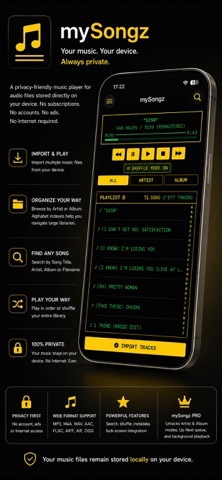
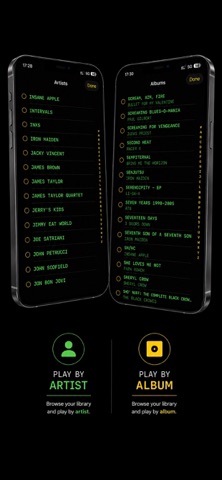
mySongz is a local music player for enjoying your own audio files — without accounts, streaming services or complicated library management. Import tracks from the Files app or transfer them through Finder, then listen in a clean, focused player designed around your personal music collection. mySongz reads available title, artist, album, track-number and artwork metadata to help organize your library. Key Features: • Import multiple audio files from your device • Automatically discover music stored in the app’s Music folder and subfolders • Browse and play your complete song library • Search by song title, artist, album or filename • Sort by song, artist, album or recently added • Mark songs as Favorites and play a Favorites-only selection • Shuffle or play songs in your chosen sort order • View available artist, album and artwork metadata • Quickly navigate long lists using the alphabetical index • Seek within tracks and use previous, pause, play, stop and next controls • Delete individual tracks or clear the complete library • Keep your imported music and Favorites available between launches mySongz Pro adds: • Background Playback — keep listening while using other apps or when your device is locked • Lock Screen Controls — control playback using the Lock Screen and system media controls • Artist Play Mode — listen to tracks by a selected artist • Album Play Mode — play a selected album in track order when metadata is available • "up next" Queue — add songs without interrupting the current track, then reorder or remove them as needed The Artist and Album modes use metadata contained in your imported audio files. Your music stays under your control. mySongz does not require an account, does not collect personal data and does not track you. Import your tracks and make your personal music collection easy to enjoy.
Latest release
What’s New
This update makes it easier to organise your favourites, explore your music and control what plays next. • Mark songs as favourites from any library view or search. • Browse and play your favourites from the new heart tab. • Tap any song in "up next" to play it immediately. • Keep your music playing while browsing by artist, album or favourites. • Add songs to "up next" from artist, album, favourites and search results. • General playback, favourites and queue improvements for a smoother listening experience.
Audience growth
Ratings growth
Baseline captured. Growth appears after the crawler observes a changed rating count.
Momentum comes from crawler snapshots for the tracked storefront. “Viral growth signal” means unusually fast recent rating gains; it is an indicator, not download data.
Price tracking
Price intelligence
First snapshot captured. The trend line starts after the next crawler price observation.
- First observed Aug 15, 2026 · 6:45 PM Free
Screenshots