About this app
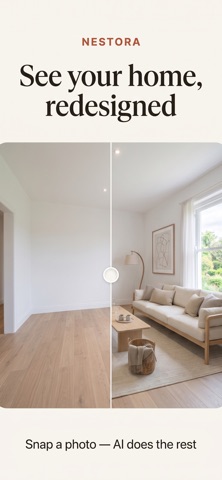
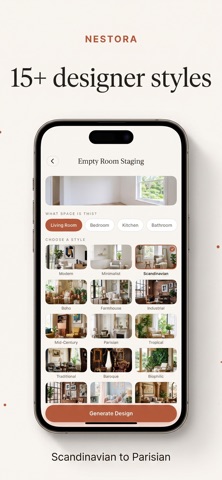
Nestora turns a photo of your room into a designer-quality makeover — in seconds. Snap a picture, pick a style, and watch AI reimagine your space while keeping your room's real architecture: same walls, same windows, same layout. Then sweep the before/after slider to see the transformation. SIX DESIGN MODES • Interior Redesign — restyle any furnished room • Empty Room Staging — furnish an empty space instantly • Walls & Paint — preview paint colors and wallpaper • Floor Restyle — try new parquet, tile or stone • Exterior & Garden — reimagine facades, gardens and patios • Custom Prompt — describe any idea in your own words 15+ DESIGNER STYLES Scandinavian, Modern, Minimalist, Boho, Farmhouse, Industrial, Mid-Century, Parisian, Tropical, Traditional, Baroque, Biophilic, SoHo Loft, Pastel Dream, Ancient Egypt and more. HOW IT WORKS 1. Photograph your room (or pick a photo) 2. Choose a mode and style — or write your own prompt 3. Get a photorealistic redesign in seconds Every design is saved to your gallery with its before/after comparison, ready to save or share in high quality. WHY NESTORA • True to your room — architecture is preserved, so results look achievable • Fast — most designs are ready in 10–30 seconds • Private — no account needed; your photos are processed securely and never stored on our servers • Great for real life — planning a renovation, staging a listing, refreshing a rental, or just dreaming FREE TO TRY Your first 3 designs are free. NESTORA PRO • Weekly: $6.99/week — 50 designs every week • Monthly: $14.99/month — 200 designs every month, save 50% Need more? Top up anytime with credit packs (25 or 80 designs) that never expire. Subscriptions renew automatically until cancelled at least 24 hours before the end of the current period. Manage or cancel anytime in your App Store account settings. Prices may vary by region. Terms of Use: https://appfusionutilities.com/nestora/terms_of_use.html Privacy Policy: https://appfusionutilities.com/nestora/privacy_policy.html Questions or ideas? support@appfusionutilities.com
Audience growth
Ratings growth
Baseline captured. Growth appears after the crawler observes a changed rating count.
Momentum comes from crawler snapshots for the tracked storefront. “Viral growth signal” means unusually fast recent rating gains; it is an indicator, not download data.
Price tracking
Price intelligence
First snapshot captured. The trend line starts after the next crawler price observation.
- First observed Oct 12, 2026 · 7:49 PM Free
Screenshots