About this app
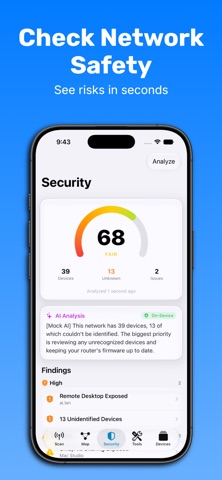
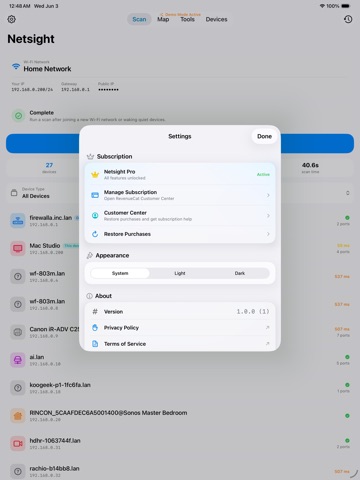
Netsight is a native network scanner and security toolkit for iPhone and iPad. Scan your local network in seconds, identify every connected device, see how it all fits together, and check for known security issues, all from your phone. WHAT YOU CAN DO • Discover devices: Scan your network and find everything connected to it, fast. • Identify what's what: Automatic fingerprinting using manufacturer (OUI), DNS, and HTTP signals turns a wall of IP addresses into real device names. • See your network: An interactive, force-directed topology map shows how your devices connect and rearranges live as the scan runs. • Check for risks: Look up known vulnerabilities (CVEs) for the devices on your network. • Understand findings: On-device AI, powered by Apple's Foundation Models, explains what a result means in plain English. BUILT-IN TOOLS • SSH terminal to connect to your servers and devices • Wake-on-LAN to power on machines remotely • RTSP viewer to check in on compatible IP cameras BUILT FOR iOS Written natively in Swift and SwiftUI for modern iPhone and iPad. Scanning runs locally on your device and your own network. NO ADS. NO ACCOUNT. Netsight is free. No ads, no sign-up, every feature available to everyone. If you'd like to support development, there's an optional tip jar. Whether you run a homelab, manage a small office network, or just want to know what's connected to your Wi-Fi, Netsight gives you a clear, fast view of your network.
Latest release
What’s New
What's New: See what changed since your last scan — new devices, returning devices, and devices that dropped off your network are now called out automatically, right on the scan screen and in your scan history. Refreshed empty states and device icons throughout the app to feel more at home on iOS. On-device AI security analysis now makes smarter use of its available context on both small and large networks, so more relevant devices and vulnerabilities get covered in the write-up. Fixed an issue where a device could briefly show as both "new" and "gone" if its network identity changed between scans. Various copy fixes (pluralization, "Wi-Fi" capitalization) and visual polish across Port Scanner, Security, Speed Test, and Who's on Wi-Fi. Removed the device-type breakdown chart from the Network overview screen (per-type counts are still available from the Devices tab filter). General reliability improvements. Added optional tip jar to support the developement of the app Bug Fixes + Improvements
Audience growth
Ratings growth
Baseline captured. Growth appears after the crawler observes a changed rating count.
Momentum comes from crawler snapshots for the tracked storefront. “Viral growth signal” means unusually fast recent rating gains; it is an indicator, not download data.
Price tracking
Price intelligence
First snapshot captured. The trend line starts after the next crawler price observation.
- First observed Sep 11, 2026 · 9:27 AM Free
Screenshots