About this app
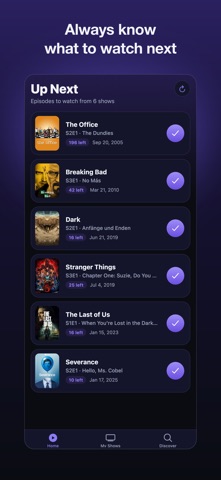
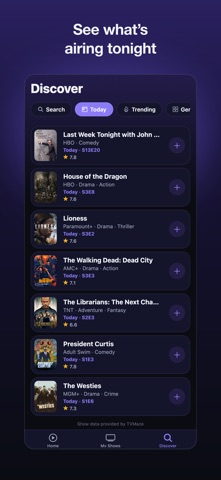
NextEp is the simplest way to keep track of the TV shows you're watching — and never lose your place again. Add any series, mark episodes as you watch them, and NextEp tells you exactly what to watch next. Your entire watch history lives on your device: no account, no sign-up, no ads. WHAT YOU CAN DO • Up Next — See the next episode to watch for every show, sorted so you always know where you left off. • Coming Up — Track upcoming episodes with a countdown to their air date. • My Shows — Browse your whole collection at a glance, with progress bars and a quick filter. • Discover — Search thousands of TV shows and start tracking in one tap. • One-tap tracking — Mark a single episode, a whole season, or everything up to a point. • Stay current — Pull to refresh and NextEp checks your shows for newly aired episodes. PRIVATE BY DESIGN Everything you track is stored locally on your device. NextEp doesn't require an account and doesn't collect your personal data. Show information is provided by the free TVMaze community database. BEAUTIFUL & SIMPLE A clean, modern interface with full support for light and dark mode. Fast, focused, and made for people who just want to keep up with their shows. Download NextEp and always know what to watch next.
Latest release
What’s New
Your watch history can finally leave this phone. • Backup & restore — Export your library to a file you can save to Files, send to yourself, or restore on a new device. Restoring can merge with the shows you already track, or replace them. • Episode details — Tap any episode for its still, synopsis and rating. • A bigger Discover — New Today, Trending and Genres tabs show what's airing right now, not just what you search for. • Your stats — Episodes watched, total watch time, how much is waiting for you, and your most-watched shows. • Archive — Hide shows you've finished or paused without losing their history. • Add to calendar — Put an upcoming episode in your calendar with one tap. • Faster refresh — Checking for new episodes now takes a single request instead of scanning your whole library.
Audience growth
Ratings growth
Baseline captured. Growth appears after the crawler observes a changed rating count.
Momentum comes from crawler snapshots for the tracked storefront. “Viral growth signal” means unusually fast recent rating gains; it is an indicator, not download data.
Price tracking
Price intelligence
First snapshot captured. The trend line starts after the next crawler price observation.
- First observed Aug 21, 2026 · 12:08 AM Free
Screenshots