About this app
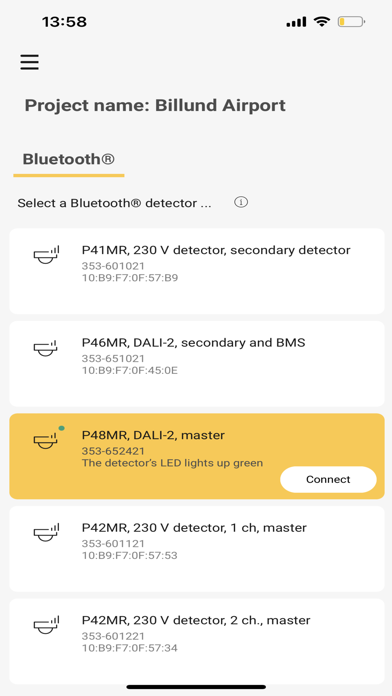
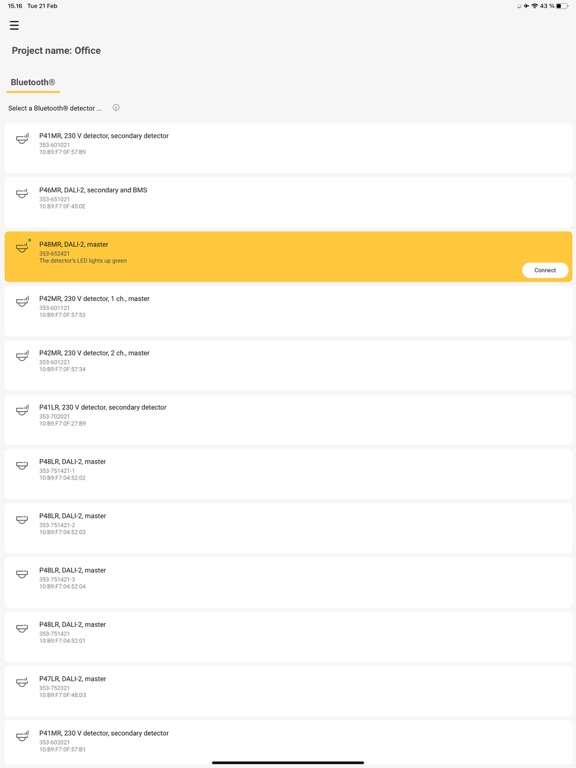
This app allows you to efficiently commission and control Niko detectors via your smartphone or tablet. No need for additional tools such as a computer, remote control or dongle. Moreover, you can easily configure daylight control with advanced functions such as multi-zone, day/night mode, several lighting scenarios, etc. What do I need? Your installation should include one or more P40/M40 detectors. Your smartphone/tablet should also be equipped with Bluetooth®. In addition, make sure your smartphone/tablet is connected to the internet. The Niko detector tool app is available in several European languages. Features • Easily configure parameter settings via guided commissioning • Customize detector configurations to meet your needs • Reuse saved configurations for other installations and share the configuration files with colleagues • Secure your detector with a four-digit pin code 2-way Bluetooth® communication This feature ensures easy commissioning and optimal communication between the detectors and the app. It allows the app to provide real-time information on the detector settings, giving you full insight into all relevant parameters and allowing you to easily modify your installation afterwards Niko detector tool portal This website is linked directly to the Niko detector tool app and allows you to efficiently manage your projects, find saved detector settings and reuse existing configurations for other installations. Use the MAC address on your detector to retrieve the saved configuration details. By downloading the app for Niko detectors, you accept the terms and conditions that you can find on https://www.niko.eu/en/legal/privacy-policy.
Latest release
What’s New
General app optimisations.
Audience growth
Ratings growth
Baseline captured. Growth appears after the crawler observes a changed rating count.
Momentum comes from crawler snapshots for the tracked storefront. “Viral growth signal” means unusually fast recent rating gains; it is an indicator, not download data.
Price tracking
Price intelligence
First snapshot captured. The trend line starts after the next crawler price observation.
- First observed Aug 21, 2026 · 12:26 AM Free
Screenshots