About this app
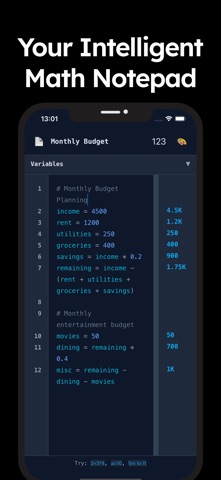
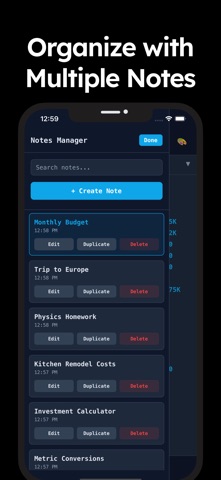
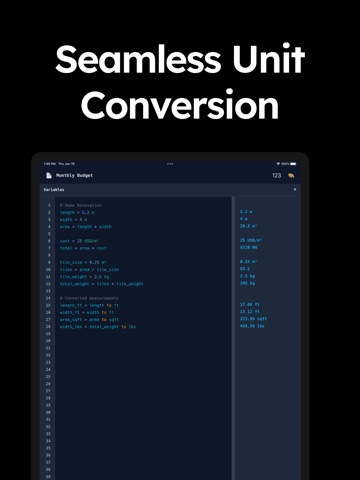
Stop juggling apps! NoteCalc is the revolutionary smart calculator and notepad that lets you perform calculations inside your notes. It’s the perfect blend of a simple text editor and a powerful math solver, designed for students, engineers, and professionals. NoteCalc seamlessly combines a powerful text editor with a live math engine. Perform complex calculations, manage your finances, or solve engineering equations, all in one organized space. Your results update in real-time as you type! A CALC THAT DOES MORE • Variables: Finally, a calculator with memory! Assign values to words like price = 49.99 or total = price * 1.07 and reuse them anywhere. • Live Math Solver: Your equations are solved instantly as you type. No need to press equals. It's a true auto calc experience. • Unit Converter: Seamlessly convert between units right in your expressions. Handle length (meters, feet), weight (kg, lbs), volume (liters, gallons), and more. • Currency Converter: Get real-time exchange rates for 30+ currencies, including USD, EUR, GBP, JPY, and even cryptocurrencies like BTC and ETH. Perfect for finance and travel planning. • Smart & Scientific: From basic arithmetic to complex expressions with parentheses, NoteCalc handles it all. It supports large number suffixes (2.5M for 2,500,000) and scientific notation. YOUR MATH, ORGANIZED • Notepad Interface: Ditch the clunky calculator buttons. Type your calculations naturally in a clean, note-based workspace. • Multiple Notes: Create separate notebooks for every project, class, or budget. Keep your work organized and easy to find. • Auto-Save: Never lose your progress. All your notes and variables are automatically saved. • Search & Manage: Quickly find the note you need. Rename, duplicate, or delete notes to keep your workspace tidy. INTELLIGENT & INTUITIVE • Syntax Highlighting: Numbers, variables, units, and comments are color-coded, making your calculations easy to read and debug. • Comment Your Work: Add notes and explanations to your math using // or # to document your process. • Error Checking: Smart error highlighting instantly shows you if an expression is invalid, so you can fix it fast. • Variable Tracking: See a live list of all the variables you've defined in your note. PERFECT FOR: • Students: A must-have for math, physics, chemistry, and engineering homework. Keep your work neat and show your steps. • Engineers & Scientists: Perform complex calculations with units and variables. Perfect for quick checks and scratchpad work. • Business & Finance Professionals: Create quick budgets, forecast revenue, and calculate profit margins without a spreadsheet. • Everyday Use: Ideal for personal finance, project planning, and quick currency or unit conversions. NoteCalc is the ultimate productivity tool for anyone who works with numbers. It's the smart calculator that grows with your needs. Download NoteCalc today and transform the way you calculate! Privacy Policy: https://www.dzeveckij.studio/apps/notecalc Terms of Use: https://www.apple.com/legal/internet-services/itunes/dev/stdeula/
Latest release
What’s New
Bug Fixes
Audience growth
Ratings growth
Baseline captured. Growth appears after the crawler observes a changed rating count.
Momentum comes from crawler snapshots for the tracked storefront. “Viral growth signal” means unusually fast recent rating gains; it is an indicator, not download data.
Price tracking
Price intelligence
First snapshot captured. The trend line starts after the next crawler price observation.
- First observed Sep 8, 2026 · 2:52 AM Free
Screenshots