About this app
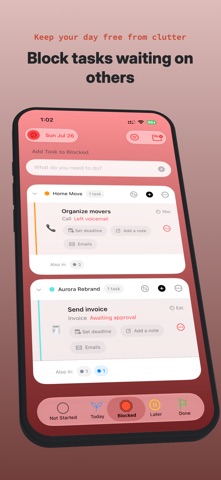
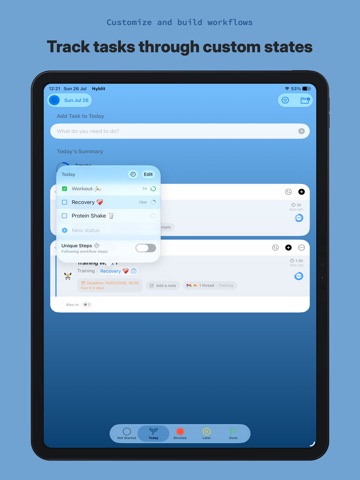
Get organised with Nyblit, the task manager built for real-world productivity. Most to-do apps treat tasks as either “done” or “not done”. But real work is rarely that simple. A task might be waiting for a client reply. Blocked by a colleague. Paused until tomorrow. In progress, but not actionable right now. When all of those tasks sit in one long list, they create clutter, pressure and mental overload. Nyblit is different. Nyblit began more than 20 years ago as a FileMaker database shared between a small group of friends. It was built around a simple observation: at any given time, more than half of the tasks on your list cannot actually be acted on. You may be waiting for a reply, blocked by someone else or delaying something until later. By moving those tasks out of your immediate view (while continuing to track them safely) your workload becomes clearer, calmer and far more achievable. Nyblit uses ‘state-based’ task management to show you what needs your attention now, while keeping everything else safely organised and out of the way. A simple phone call might move through states like these: • TODAY: Ready to make the call. • BLOCKED: You left a voicemail and are waiting for a callback. • LATER: The line was busy, so Nyblit reminds you to try again in 10 minutes. • DONE: The call is complete. Nyblit lets you create custom workflows so it understands what kind of task you are doing. Tap “Left Voicemail” and the task moves to BLOCKED. Tap “Call Later” and Nyblit offers a timer and alert. A workflow can represent anything you do regularly, from writing an email to restoring a car. Each one can include its own statuses, delays, subtasks and time estimstes. So, instead of staring at a cluttered list of half-actionable tasks, you can see what is active, which stage each task has reached, what is blocked and what is paused. SHARED TASKS Nyblit lets you share tasks and projects, making it easier to collaborate with teams, clients and family. GMAIL INSIDE YOUR TASKS (Beta) Your tasks and your communication are finally together. Email threads can live directly inside the task they relate to. PROGRESS YOU CAN SEE Daily activity stats and task progress rings, give you a simple visual sense of progress. ADHD Friendly Nyblit was created by a developer with ADHD. Sometimes the problem is not that you have too much to do. It is that too many things are sitting in front of you when they are not actually actionable. Nyblit brings clarity to your day. POWERFUL & FLEXIBLE Organise tasks into projects. Delay tasks with smart timers. Sync deadlines with Apple Calendar. Add rich notes with text and links. Everything syncs securely via iCloud. BEAUTIFULLY CRAFTED Nyblit feels fast, fluid and calm. With a clean interface, smooth animations, Dark Mode and Light Mode support, widgets, Live Activities and Dynamic Island support, it feels right at home on iPhone, iPad and Mac. FEATURES • One purchase for access on iPhone, iPad and Mac • State-based task management that goes beyond “done” and “not done” • Shared tasks and projects for teams • Gmail integration so relevant email threads can live inside tasks • Daily activity stats • Task progress rings • Apple Calendar and Reminders integration • iCloud sync across your devices • Home Screen Widgets • Dynamic Island support • Repeating tasks with advanced scheduling • Rich notes with text and links • AI-powered suggestions for custom task statuses where supported • Manual backups Terms of Use (EULA): https://www.apple.com/legal/internet-services/itunes/dev/stdeula/
Latest release
What’s New
This is our biggest update yet. • Shared Tasks & Projects You can now share tasks and projects with other Nyblit users, making it easier to collaborate with teams, clients, family members or anyone else you work with. • Daily Activity Stats Monitor your daily task activity and get a clearer picture of how your work is moving. • Task Progress Rings New visual progress rings help you see task and project progress at a glance. • Improvements & Refinements We have also made performance improvements, interface refinements and general fixes throughout the app. • Gmail Integration (Beta) Gmail threads can now live inside the tasks they relate to. Keep client feedback, decisions and important conversations connected to the work itself. (We are testing out this feature so please use with caution for now.) New in 2.0.2 - Bundled workflows, improved tutorials, reminders and priority alarms for deadlines, priority alarms for Later tasks. Lots of minor bug fixes and UI fixes. New languages supported - Arabic, Hebrew, Japanese, Korean, Russian and Ukrainian.
Audience growth
Ratings growth
Baseline captured. Growth appears after the crawler observes a changed rating count.
Momentum comes from crawler snapshots for the tracked storefront. “Viral growth signal” means unusually fast recent rating gains; it is an indicator, not download data.
Price tracking
Price intelligence
- First observed Aug 8, 2026 · 4:10 PM Free
Screenshots