About this app
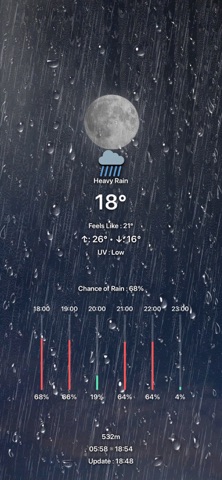
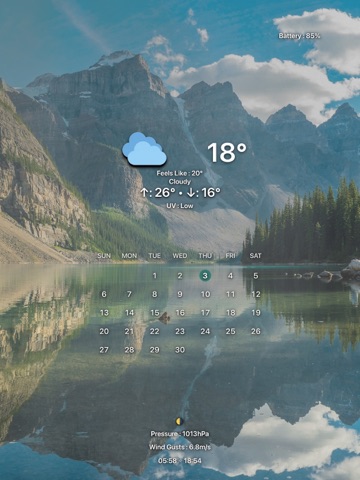
Put weather and useful information on your Lock Screen and Home Screen. Wallpapers created in ODODOCK are applied and updated through Apple Shortcuts. Ododock turns a photo into a wallpaper with weather, events, reminders, and more. Choose what to show, then adjust it directly in the preview. Weather at a glance See the current and feels-like temperatures, daily highs and lows, and a four-day forecast. View hourly rain chances and temperature changes in graphs, and compare the temperature with the same time yesterday. Add humidity, wind, UV index, precipitation, and other details you need. Separate Lock Screen and Home Screen layouts Create four independent setups: day and night for both your Lock Screen and Home Screen. Swipe between screens in the preview and quickly copy backgrounds or item settings between setups. Edit directly in the preview Tap an item to edit it, or touch and hold to move it. Adjust size, alignment, colors, shadows, and icon styles. Reframe your photo and use depth effects or background blur to keep the layout clear. Weather effects on your background Dynamic Weather adds visual effects for rain, snow, fog, and other conditions. Color effects reflect the moments just after sunrise and before sunset. The sun and moon appear in positions that match the time, with support for moon phases and your own sun and moon images. Events and everyday information Show daily, weekly, or monthly events and reminders. Add a calendar, notes, a second time zone, month and year progress, battery level and changes, a mini map, or Google search trends. Themes and backups Preview and apply designs from the theme library. Export your own themes with their background photos and settings to keep a backup or import them on another device. Connect with Apple Shortcuts Generate separate Lock Screen and Home Screen wallpaper images from your saved settings. Connect them to Apple Shortcuts to simplify image creation and wallpaper updates. Wallpaper changes are carried out by shortcuts you configure. Basic features are free. Some advanced features require Ododock PRO, available as a monthly subscription or a one-time lifetime purchase. Weather data is provided by Apple Weather and search trends by Google Trends. Fetching updated weather requires an internet connection and location permission. Offline, the app uses saved data where available. Events and reminders require permission to access the corresponding data. Some information may be unavailable depending on your region or the data provider. Feedback: brick@pixelbricktek.com Privacy Policy: https://pixelbricktek.github.io/Ododock/privacy Terms of Use (EULA): https://www.apple.com/legal/internet-services/itunes/dev/stdeula/
Latest release
What’s New
1. Added PM10 and PM2.5 display items. Choose from value, status, or value + status. Available in the free version as well. 2. Added the Going Home Weather display item. Check the weather, temperature, and chance of precipitation for your current location at a specified time, with an option to hide it after that time. (PRO) 3. Added the Today’s Photos & Videos display item. See how many photos and videos were taken or added to the Photos app today. (PRO) 4. Added support for custom fonts. Import TTF and OTF fonts, apply them to display items, remove them, or restore the default font. 5. You can now apply settings to multiple screens at once. Select any combination of Lock Screen and Home Screen day/night settings to apply background photos or text styles together. 6. Added Simple 2 and Blue weather icon packs. They can be used for both weather icons and the 4-day forecast. 7. Added quick editing options. You can now choose the line color for temperature graphs and the separator between high and low temperatures. 8. Added Q&A search and a font usage guide, and improved how long questions are displayed. 9. Improved text style application and calendar number alignment, and refined weather icons and sunrise/sunset effects. 10. Fixed the display item counter so it accurately reflects all enabled items. 11. Other bugs have been fixed.
Audience growth
Ratings growth
Baseline captured. Growth appears after the crawler observes a changed rating count.
Momentum comes from crawler snapshots for the tracked storefront. “Viral growth signal” means unusually fast recent rating gains; it is an indicator, not download data.
Price tracking
Price intelligence
First snapshot captured. The trend line starts after the next crawler price observation.
- First observed Sep 11, 2026 · 10:03 PM Free
Screenshots