About this app
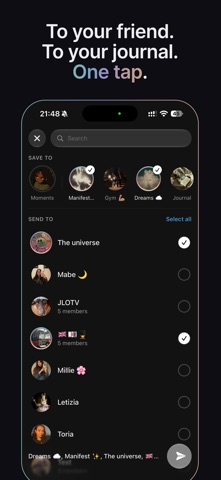
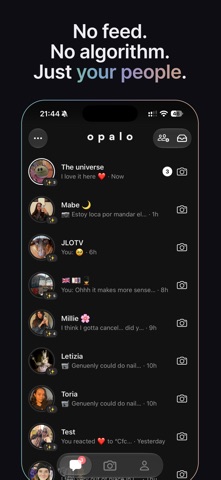
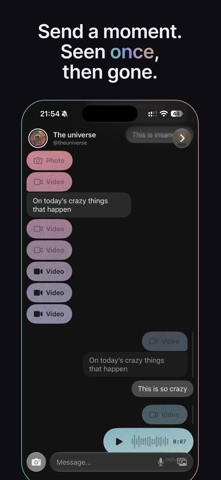
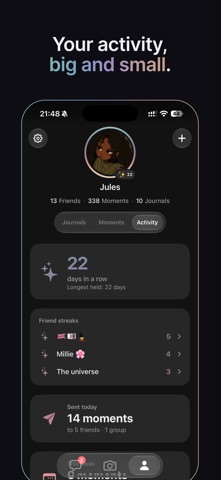
Opalo is for the moments you normally wouldn't think worth sharing with everyone. Send to your closest people — they see it once, then it's gone. Keep the rest in your private profile and create journals. We tend to broadcast the perfect parts of our lives, but the fun, imperfect, messy parts have nowhere to go — a rant about your awful boss, the way you messed up your hair by cutting it at home, the random thought that occurred to you while you have your face mask on. We either keep it to ourselves, send a text (boring), or it just sits in your camera roll, lost forever. Opalo gives each a home. One tap, two directions, three choices: Send moments to a friends, keep them for yourself in your general moments, or add them to specific journals... Or do all 3, its up to you. No audience. No algorithm. No ads. Nowhere to perform. SEND A MOMENT • Capture a photo or video and send it to multiple people or a small group. • They see it once, then it's gone — nothing to save, nothing on show. • Every send is a real conversation, not a broadcast to a crowd. KEEP WHAT MATTERS • Save your own photos and videos to your moments and private journals only you can see. • Choose how you wish to view them: on a calendar, stacked by day or see all. • Your moments stay yours. Literally. Everything stays local on your phone/iCloud. SHARE A JOURNAL • Build a shared journal with the people you choose. • Everyone adds to the same place — one trip, recipes you loved making, cool dogs you saw on your walks. Be creative! TALK, DON'T PERFORM • Simple 1:1 and small-group chat with voice notes and reactions. • Warm streaks that celebrate a real back-and-forth — never guilt you into showing up. TWO WAYS TO USE IT • Social mode: camera, chat, and sending to your people while still keeping your private moments. • Journal mode: just you, your camera, and your private moments and journals — quiet by design. ALWAYS ONE TAP AWAY • Add an Opalo camera button to your Lock Screen or Control Centre. • Share links, photos and videos straight into Opalo from Photos or any other app. WHO IT'S FOR For the two (or five) people you actually talk to. For anyone who stopped sharing because the audience got too big. For keeping the parts of your life that were never meant for a crowd. Opalo is free. iPhone only. Real people, real moments.
Latest release
What’s New
ESPAÑOL Opalo is fully translated. Now if your phone is in Spanish, the whole app will be too! But if you just want to practice your Spanish in app you can just switch the app to Spanish in settings. CHAT, REDESIGNED • Photos, videos and voice notes are pills now, so a thread reads like a conversation instead of a wall. • Replies show the message they answer with an animation. • React to photos and videos, not just text. Double tap to react, and take it back whenever you like. • See when a friend is typing, recording a voice note, or has the camera open. • A voice note is as wide as it is long, so you know what you are about to play. EASIER TO GET AROUND • Some more room for the bottom bar. Things were getting a bit crammed with all the possibilities. • Settings is a hallway now instead of a warehouse: five doors where forty rows used to be. • Corners, spacing and greys were remeasured on every screen, and light mode reaches the places it used to miss. JOURNALS • Tap + in a journal and the camera opens ready to add straight to it. • Deleting a journal asks what you want to do with the moments inside it. YOUR DATA, YOUR CALL • iCloud backup has an off switch, and Settings says plainly what turning it off costs. • Export all your media whoever you want. ALSO • VoiceOver names every button and reads every card. • Invite a friend with a link. • A steadier back camera, and dozens of fixes across capture and captions.
Audience growth
Ratings growth
Baseline captured. Growth appears after the crawler observes a changed rating count.
Momentum comes from crawler snapshots for the tracked storefront. “Viral growth signal” means unusually fast recent rating gains; it is an indicator, not download data.
Price tracking
Price intelligence
First snapshot captured. The trend line starts after the next crawler price observation.
- First observed Sep 4, 2026 · 7:44 AM Free
Screenshots