About this app
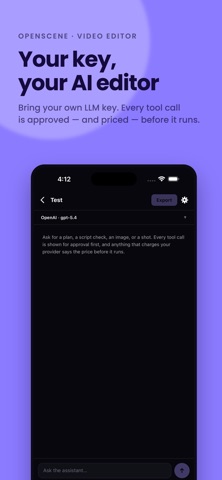
OpenScene is a local-first video editor: import clips, cut and arrange them on a timeline, then fill gaps with AI-generated video, voice, or images when you need them. Key features - Timeline editing: a lightweight editor with import, split, trim, and undo/redo. Drag a clip to move it, drag its ends to trim. - AI Video Studio: generate video clips from a prompt and drop them straight onto the timeline. - AI Voice Studio: turn a script into natural-sounding narration. - AI Image Studio: generate images for thumbnails or insert shots. - AI Assistant: ask for a plan, a script check, or a shot list in plain conversation. Every tool call is shown on screen for approval first, and anything that would charge your provider states the price before it runs. Nothing runs silently. Local-first by design - Imported clips are copied into the project, so it keeps working even after the original is deleted from your photo library. - The app only reads your photo library when you pick something yourself — it never scans your library on its own. - It writes to your photo library only when you ask it to save an export. - Exactly two permissions are requested: photo access to import clips, and photo write access to save a finished export. A companion to the desktop app OpenScene mobile shares the same timeline model and editing rules as the desktop editor. It fits a workflow where you trim clips or rough out an AI draft on the go, then finish the polish on desktop. What this version doesn't do yet Heavy on-device video processing — the kind of local FFmpeg pipeline a phone can't run without a separate, framework-specific implementation — isn't included yet. The app is under active development, focused on the flow between editing and AI generation.
Latest release
What’s New
Change one shot without redoing the rest, and let the app check its own work. • Every shot in a plan can carry its own description • Redo one shot with a note — "slower, no text on screen" • Set a monthly limit on what generation may spend, and see the total • A cut that cannot come out right is refused before the export starts • The finished file is read back and compared with your cut Fixes: a short, silent or wrongly shaped export no longer reports success.
Audience growth
Ratings growth
Baseline captured. Growth appears after the crawler observes a changed rating count.
Momentum comes from crawler snapshots for the tracked storefront. “Viral growth signal” means unusually fast recent rating gains; it is an indicator, not download data.
Price tracking
Price intelligence
First snapshot captured. The trend line starts after the next crawler price observation.
- First observed Sep 12, 2026 · 2:49 AM Free
Screenshots