About this app
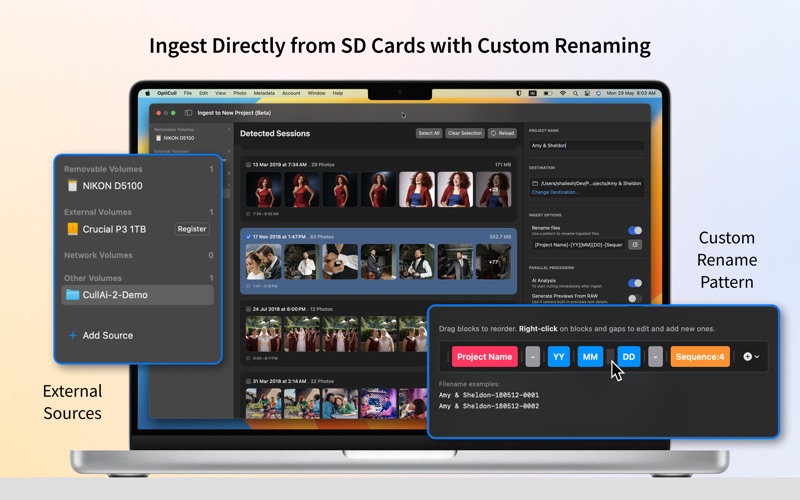
OptiCull is the ultimate photo culling app for lightning-fast automated and manual culling. It intelligently groups duplicates into scenes, flags blurry/blinking faces, and automatically selects the best keepers based on your preferences. For manual culling, effortlessly sift through scenes using our innovative close-up panel, side-by-side comparison, and synced zoom modes. LIGHTNING-FAST RAW PREVIEWS & AI ANALYSIS * Never wait for previews or close-ups to load while reviewing your shoot. * Start reviewing instantly while OptiCull analyzes 1,000 photos in under a minute. GROUPS DUPLICATES INTO SCENES IN REAL-TIME * Auto-grouping makes it easy to compare similar shots side-by-side and select a diverse set of keepers. * Adjust grouping sensitivity to combine more photos and aggressively cut down your final selection. SIDE-BY-SIDE COMPARE & SYNCED ZOOM MODES * Select multiple photos or entire scenes to compare them side-by-side, maximizing screen real estate. * Use synced zoom modes to compare the exact same face or detail across multiple photos at once. * Use Survey Mode to rapidly sift through entire scenes instead of clicking photo-by-photo. MAGI-CULL & AUTO-RATE: INSTANT & PERSONALIZED * Automatically rejects photos with blurry or blinking subjects based on your thresholds. * Selects the single best, most diversified keepers from each scene. * Customize your rating workflow: OptiCull automatically assigns your preferred star ratings. * Persistant assessment overrides. NEW: INGEST WITH FILE RENAMING * External Drive Ingest — Connect an SD card and begin ingesting immediately - no manual copying required. * Flexible Targets — Ingest directly into a brand-new project, or seamlessly add remaining photos into an existing one. * Configurable File Renaming — Maintain asset organization from the start by defining custom Rename Patterns. * Simultaneous Background Processing — While photos copy, leverage in-memory RAW data to complete tasks concurrently: - AI Analysis: So you can start culling immediately. - Preview Generation: Generate high-quality previews if built-in camera previews lack detail. FILTERS & SMART WARNINGS FOR QUICK REVIEW * Focus and eye status are highlighted under each face for quick verification without zooming in. * Auto-Cull assigns blur/blink warnings to keepers when no better alternative exists. * Flags photos without people that couldn't be assessed, cleanly separating them for your review. BUILT FOR YOUR WORKFLOW — Ship it in a click 1. Ingest & Analyze — Connect your card, copy, rename, and run AI analysis simultaneously. 2. Cull — Review your photoshoot effortlessly using automated or manual tools. 3. Edit — Drag or export to your favorite editor like Lightroom or Capture One with one click. PRIVACY & SECURITY * All photos remain on your local machine. AI processing happens 100% on-device. * OptiCull never uploads your images to external servers. UNLEASH YOUR MAC’S POTENTIAL * Apple Silicon: Fully optimized for M-series chips. * Customizable Keyboard Shortcuts: Mac-native hotkeys for almost every action. * RAW Support: Supports native macOS RAW formats and RAW+JPG workflows. * Core Image, Core ML, Metal: Hardware-accelerated previews and AI. Cut culling time by up to 90%! Spend drastically less time sorting and more time doing what you love. OPTICULL FREE VS. OPTICULL PRO Upgrade to OptiCull Pro to unlock advanced AI features. All installs include a 14-day free trial of Pro. Choose from flexible lifetime (non-subscription) or monthly plans. View current pricing and special offers at Account -> Upgrade to OptiCull Pro. Once the trial expires, Free Mode remains fully functional for manual culling. Terms of Use (EULA): https://www.apple.com/legal/internet-services/itunes/dev/stdeula/ Privacy Policy: https://dopeai.tech/privacy Learn more: https://dopeai.tech/opticull Follow us @dopeaitech on Instagram, Twitter, YouTube, and Facebook.
Latest release
What’s New
* External Drive Ingest: Connect an SD card or external drive and begin ingesting immediately—no manual copying required. * Flexible Project Targets: Ingest directly into a brand-new project, or seamlessly ingest additional photos into an existing one. * Configurable File Renaming: Maintain asset organization from the moment of ingest by defining custom Rename Patterns. * Simultaneous Background Processing: Make the most of ingest downtime. While photos copy, leverage in-memory RAW data to complete time-consuming tasks concurrently: - AI Analysis: Runs during ingest so you can start culling immediately. - RAW Preview Generation: Generate high-quality previews on the fly if built-in camera previews lack detail.
Audience growth
Ratings growth
Baseline captured. Growth appears after the crawler observes a changed rating count.
Momentum comes from crawler snapshots for the tracked storefront. “Viral growth signal” means unusually fast recent rating gains; it is an indicator, not download data.
Price tracking
Price intelligence
First snapshot captured. The trend line starts after the next crawler price observation.
- First observed Aug 8, 2026 · 1:22 PM Free
Screenshots