About this app
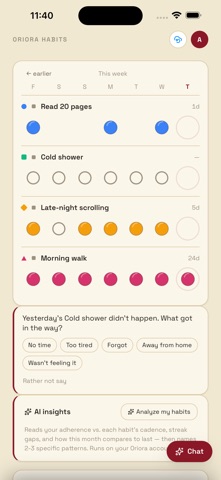
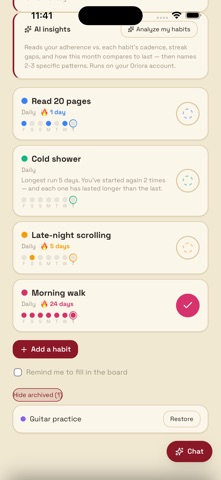
Your whole week on one screen. Habits down the side, the last seven days across, and one tap to mark a day done, a rest day, or clear. BUILD HABITS — OR BREAK THEM Track something you want to do, or something you want to stop. For a habit you're quitting, you mark the days you slip, and your streak counts the days you stayed clean. GO BACK AND FIX IT Forgot to mark Sunday? Page back through earlier weeks and correct it. Your record should match what actually happened. REAL SCHEDULES Every day, certain weekdays, or a number of times a week. Days your habit was never due don't count against you — no more being told you failed on a Sunday you were never meant to act. THE QUESTION NOBODY ELSE ASKS A day you completed tells you nothing you didn't expect. A day you missed tells you everything. After a miss, Oriora Habits asks one short question about what got in the way — then reads your answers together and tells you the pattern. WHEN A STREAK BREAKS Most trackers show you a zero. This one looks at your own record: how long your best run was, how many times you've started again, and whether each restart is lasting longer than the last. ASK INSTEAD OF TAPPING "Check in my walk on Sunday." "Add habit swimming Tue and Thu." "How am I doing?" The built-in assistant adds habits, marks days — including earlier ones — and reads your record back to you. Type it, or start a live call and just say it while you are out walking; both do the same work, and it can write your record up into a folder in your own GitHub or Google Drive. ALSO • A daily reminder to fill in your board • Archive a habit you've finished with, and keep its whole history • Per-habit colours, and day states told apart by shape, not just colour YOUR DATA Everything lives on your device. Back it up to your own GitHub or Google Drive, or export a copy — your choice, your account. Data passes through Oriora for each AI action and isn't kept by us. Oriora Habits is free to use, with AI features running on your Oriora account.
Latest release
What’s New
Bug fixes and improvements to sign-in, layout and in-app purchases.
Audience growth
Ratings growth
Baseline captured. Growth appears after the crawler observes a changed rating count.
Momentum comes from crawler snapshots for the tracked storefront. “Viral growth signal” means unusually fast recent rating gains; it is an indicator, not download data.
Price tracking
Price intelligence
First snapshot captured. The trend line starts after the next crawler price observation.
- First observed Sep 5, 2026 · 4:47 AM Free
Screenshots