About this app
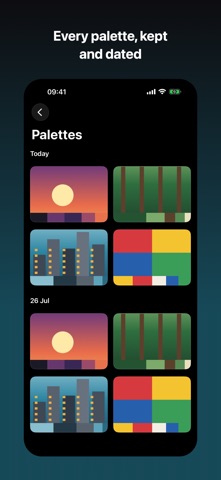
Point your camera at anything and watch its five most common colors appear as you move. Tap the shutter and the palette is saved. HOW IT READS COLOR Most color tools measure distance in RGB, where a saturated orange and a muddy brown sit close together and get merged into one swatch. Paletto clusters in CIELAB — the color space built to match human vision — and separates colors using CIEDE2000, the same difference measure the printing industry relies on. What comes back is what you actually saw. Every palette is five perceptually distinct colors, ordered by how much of the image they cover, each with its exact hex code, a plain-English name, and its share of the frame. AIM IT PROPERLY Tap the preview to focus and re-expose on the thing you want the colors from. Pinch to zoom, or jump straight to a lens your phone has. Flip to the front camera when the colors are on your side of it. FOR PEOPLE WHO WORK IN COLOR • Tap any color to copy its hex code • Drag a swatch into another app and it arrives in whatever form that app wants — a real color, a hex string, or a swatch image • Drag whole palettes out the same way • Drop an image in from Photos, Files or Safari to pull the colors out of it • Reorder a palette by dragging its swatches • Export as .ase, the swatch format Illustrator, Sketch and Affinity import KEEP EVERY PALETTE Palettes are grouped by day alongside the photo they came from. Rename them, delete them, or share one as a palette card, a plain list of hex codes, or a swatch file. PRIVATE BY DEFAULT No account. No sign-in. No network requests at all. Nothing is collected and nothing leaves your device — every frame is analyzed on the phone in about two milliseconds. BUILT TO BE USED VoiceOver announces every color by name and reads its hex code digit by digit. Dynamic Type is supported throughout, and the interface adapts rather than shrinking when text gets larger.
Latest release
What’s New
Camera controls arrive in 1.1. • Tap the preview to focus and re-expose on exactly what you want the colors from. Exposure follows the tap, so the palette matches what you aimed at. • Pinch to zoom, or jump straight to a lens your phone has — ultra-wide, wide or telephoto. • Flip to the front camera. • A new Settings screen, so you can hide any control you do not use. FIXED • Photos brought in from your library kept the sideways rotation they were stored with. They now import the right way up. • The live swatch row flickered on a still scene. It now settles until what the camera sees genuinely changes.
Audience growth
Ratings growth
Baseline captured. Growth appears after the crawler observes a changed rating count.
Momentum comes from crawler snapshots for the tracked storefront. “Viral growth signal” means unusually fast recent rating gains; it is an indicator, not download data.
Price tracking
Price intelligence
First snapshot captured. The trend line starts after the next crawler price observation.
- First observed Aug 19, 2026 · 10:55 AM Free
Screenshots