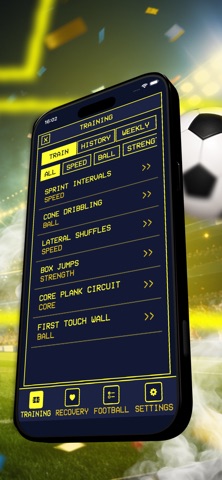
About this app
YOUR FOOTBALL DESKTOP The home screen looks like a retro computer desktop — clock, recovery streak, and your next match front and center. Tap to open sections in separate windows: training, recovery, equipment, settings. Close a window and you are back on the desktop. Simple navigation, no clutter. TRAINING Sessions are organized by category — speed, ball work, strength, and core. Each session includes a warm-up phase, a main phase, and a built-in timer. Pick a difficulty level before you start: light, match-day, or heavy. A weekly plan tracks which sessions you have completed, marking them off automatically. After a heavy session the app suggests a softer recovery plan for the following day. Full training history is saved with date and duration. RECOVERY Build a recovery plan around rest level, sleep hours, and stretching minutes. Ready-made presets are available for post-match and post-heavy-training days. A daily check-in lets you rate your leg condition from one to ten. A seven-day graph shows the trend, and your recovery streak is displayed on the home screen. Tips change depending on the active plan. All plans and check-ins are stored in history. MATCH AND EQUIPMENT Add matches to your schedule with name, date, and time. The nearest upcoming match always appears on the home screen. Before each game, run through a pre-match checklist — boots, kit, water, and anything else you need. Previous checklists are saved so you can review what you packed. RETRO PIXEL STYLE Three visual themes to choose from. Pixel-art interface with clean window-based navigation. Switch between twelve-hour and twenty-four-hour clock format. A built-in help section covers every part of the app. FEATURES Retro desktop interface with window-based navigation Training sessions across speed, ball, strength, and core categories Built-in session timer with warm-up and main phase Three difficulty levels per session Weekly training plan with automatic completion tracking Recovery plans with post-match and post-training presets Daily leg condition check-in rated one to ten Seven-day recovery trend graph and streak counter Match schedule with next-match display on home screen Pre-match equipment checklist with history Adaptive tips based on active recovery plan Three pixel-art themes and configurable clock format All data stored locally — no account, no internet, no data sharing
Latest release
What’s New
added mission-control: live countdown to the next match and training progress for the week
Audience growth
Ratings growth
Baseline captured. Growth appears after the crawler observes a changed rating count.
Momentum comes from crawler snapshots for the tracked storefront. “Viral growth signal” means unusually fast recent rating gains; it is an indicator, not download data.
Price tracking
Price intelligence
First snapshot captured. The trend line starts after the next crawler price observation.
- First observed Aug 19, 2026 · 7:39 PM Free
Screenshots