About this app
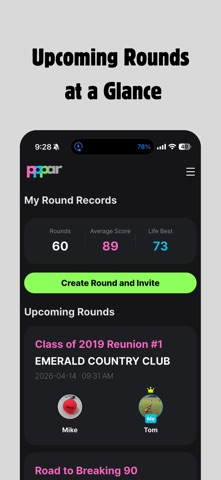
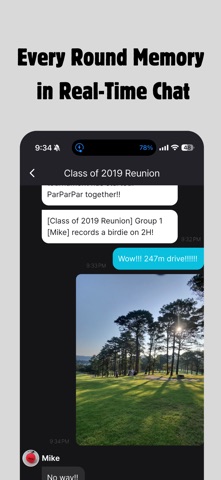
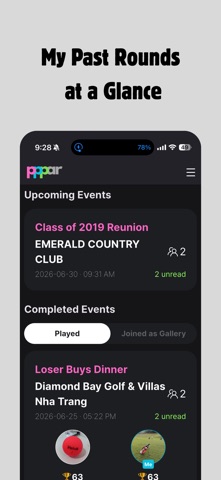
From real-time score sharing to golf club tournament management — all with ParParPar! ParParPar is a social scorecard platform for golfers. Record scores for both regular golf and park golf, and now enjoy team competitions and tournament features designed for golf clubs and communities. ParParPar!! Go beyond simply recording your round. From regular golf to park golf, and now the excitement of playing together in tournaments — make every golf experience more fun and memorable with ParParPar. ParParPar is an all-in-one golf recording and community app that lets you share scores in real time, chat with players, upload photos, invite spectators, and manage team competitions and tournaments. Key Features • Score recording for regular golf & park golf Record any round, whether on the golf course or at a park golf course, with ParParPar. • Real-time score input and sharing Enter and share scores in real time with your playing partners. Invite spectators and enjoy live support during your round. • Team competition & tournament features Run golf club events, friendly group matches, and company golf tournaments with ParParPar. Tournament organizers can create events, invite participants, and arrange groups. • Flexible handicap options Choose the handicap method that fits your tournament style and enjoy fairer, more exciting competition. • Real-time rankings Participants and spectators can check live rankings as the tournament progresses. Add more tension and excitement to every round. • Chat and photo sharing Players and spectators can chat together and capture memorable moments with photos. • Round invitations and automatic records Naturally keep track of who played, when, and where. The era of simply writing down scores is over! With ParParPar, record and share regular golf, park golf, golf club events, and tournaments in a more fun and convenient way.
Latest release
What’s New
• New Tournament Mode! Create and manage tournaments for golf clubs, friendly groups, and company events with participant invitations, group assignments, handicap settings, and live rankings. • We've fixed minor bugs and improved overall performance.
Audience growth
Ratings growth
Baseline captured. Growth appears after the crawler observes a changed rating count.
Momentum comes from crawler snapshots for the tracked storefront. “Viral growth signal” means unusually fast recent rating gains; it is an indicator, not download data.
Price tracking
Price intelligence
First snapshot captured. The trend line starts after the next crawler price observation.
- First observed Aug 19, 2026 · 7:20 PM Free
Screenshots