About this app
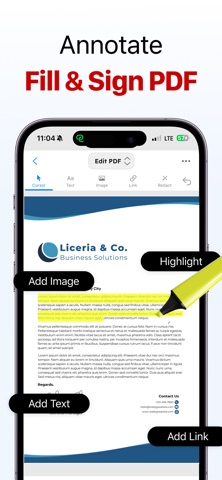
PDF Editor, Reader & Converter is a modern productivity app designed to simplify everyday document tasks through a clean, organized, and user-friendly experience. Whether you are managing study material, handling office paperwork, organizing digital files, signing forms, scanning pages, or converting content into shareable formats, the app brings multiple essential utilities together in one streamlined workspace. Built for speed, convenience, and smooth navigation, it helps users complete important tasks quickly without switching between multiple apps. Created with a focus on usability and workflow efficiency, PDF Editor, Reader & Converter helps students, professionals, freelancers, creators, and business users stay productive while working with digital documents. From organizing pages and combining files to scanning papers and protecting personal information, every tool is designed to make document management simple and accessible for everyday use. Features Document Creation & Conversion * Create files from images and text * Convert documents into shareable formats * Export web content for offline access * Transform pages into image files Editing & Organization Tools * Combine multiple files into one * Split large documents into separate sections * Rearrange and organize pages * Remove unwanted pages easily * Rotate and manage page layouts Scan & Annotation Tools * Scan physical documents using the camera * Add notes, highlights, and annotations * Fill forms digitally * Add signatures directly from your device Privacy & Security * Protect important files with passwords * Access secured documents when authorized * Designed with user privacy in mind Productivity Utilities * Quick sharing options * Clean and simple interface * Fast processing experience * Optimized for everyday workflow tasks Designed for Everyday Use PDF Editor, Reader & Converter is ideal for students managing assignments, professionals handling reports, freelancers sharing signed forms, and anyone who wants an easier way to organize and work with digital documents from their phone. With a minimal design and practical toolset, the app helps turn complicated document tasks into a faster and smoother experience. Subscription Purchase a plan to unlock unlimited access to all features. Terms & Privacy Policy https://sites.google.com/view/applicationterms https://sites.google.com/view/applicationsprivacypolicy
Latest release
What’s New
- Improved UI/UX - Minor Bugs Fixing
Audience growth
Ratings growth
Baseline captured. Growth appears after the crawler observes a changed rating count.
Momentum comes from crawler snapshots for the tracked storefront. “Viral growth signal” means unusually fast recent rating gains; it is an indicator, not download data.
Price tracking
Price intelligence
First snapshot captured. The trend line starts after the next crawler price observation.
- First observed Aug 6, 2026 · 12:20 AM Free
Screenshots