About this app
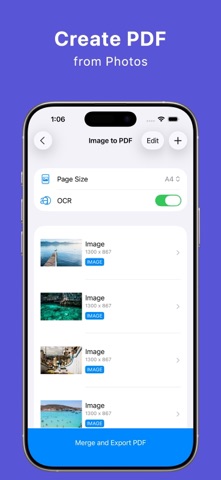
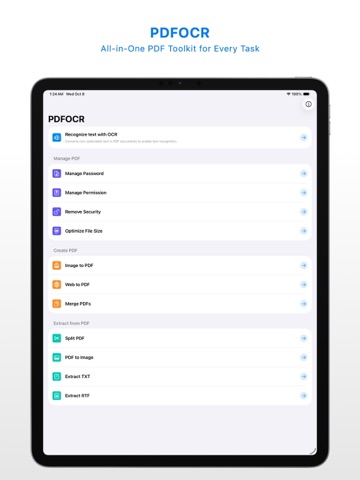
Struggling with PDF files? Say hello to PDFOCR—your all-in-one toolkit for managing and enhancing PDF documents! Whether you’re dealing with scanned PDFs without searchable text, or need specific features for better file sharing, PDFOCR makes it simple and efficient: • Extract Text with OCR: Convert scanned PDFs into searchable files by extracting embedded text. • Convert PDF to Images: Need images instead? Turn PDF pages into high-quality images with ease. • Secure Your PDFs: Add passwords or set permissions to control access, copying, or printing. • Merge or Split PDFs: Combine multiple PDFs into one, or split large documents as needed. • Create PDFs from Images: Batch your images into a single, polished PDF file. • Webpage to PDF: You can turn a long webpage into multiple PDF pages. Your Privacy Matters All tasks are performed offline, ensuring your documents are never uploaded to a server. Additional Features Include: • Compress file size without quality loss. • Extract specific text or pages from PDFs. • Remove security restrictions effortlessly. PDFOCR is continually updated with new tools to make your PDF tasks easier! Currently Available Tools: • OCR PDF • Manage Passwords & Permissions • Remove Security • Optimize File Size • Convert Images to PDF • Convert a Webpage to PDF • Merge or Split PDFs • Convert PDFs to Images • Extract TXT, RTF, or Specific Pages Have questions or feedback? Contact us anytime at support@layerz.app. Your perfect PDF assistant is here—try PDFOCR today!
Latest release
What’s New
Ads have been removed.
Audience growth
Ratings growth
Baseline captured. Growth appears after the crawler observes a changed rating count.
Momentum comes from crawler snapshots for the tracked storefront. “Viral growth signal” means unusually fast recent rating gains; it is an indicator, not download data.
Price tracking
Price intelligence
First snapshot captured. The trend line starts after the next crawler price observation.
- First observed Aug 19, 2026 · 9:03 AM Free
Screenshots