About this app
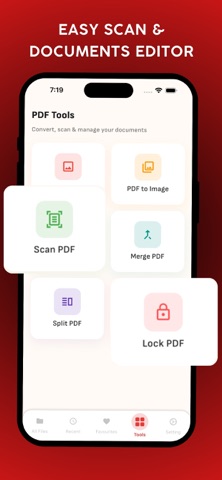
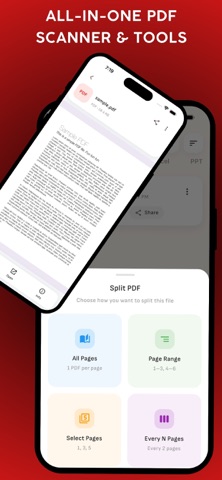
PDF Scanner: Smart Doc Tools is a simple, reliable, and efficient document scanning and PDF management app designed to handle everyday document tasks. It allows you to scan documents, convert images to PDF, manage files, and perform essential PDF operations directly on your device. The app is built for students, professionals, and personal users who need a fast and secure way to create, edit, and organize digital documents without relying on cloud services. Core Features Scan Documents to PDF: Use your phone camera to scan documents such as notes, receipts, forms, invoices, and IDs. The app creates clear, high-quality PDF files suitable for printing or sharing. Image to PDF Converter: Convert images from your gallery into PDF files. Combine multiple images into a single PDF document with proper page order and layout. PDF to Image: Extract pages from PDF files and save them as images. This is useful for sharing individual pages or using them in other applications. Merge PDF Files: Combine multiple PDF files into one document. Reorder files before merging to create a clean, organized PDF. Split PDF Files: Split PDF documents by page range, selected pages, or fixed intervals. Easily extract only the pages you need. Lock and Protect PDFs: Secure your PDF files by adding password protection. Keep sensitive documents private and protected on your device. Document Management: Built-in PDF reader for easy viewing Organize files in one place Quick access to recent and favorite documents Manage multiple file types including PDF, Word, Excel, and PPT Privacy and Security: All document processing is done offline No cloud uploads or external servers Your files remain on your device at all times Designed with privacy and data security in mind Fast, Offline and Easy to Use: Clean and intuitive user interface Optimized for fast performance Works without an internet connection Lightweight and efficient document tools Who Is This App For? Students scanning notes and assignments Professionals handling office documents Businesses managing invoices and contracts Anyone needing simple and secure PDF tools Why Choose PDF Scanner: Smart Doc Tools? PDF Scanner: Smart Doc Tools combines essential document scanning and PDF utilities into one easy-to-use app. It focuses on simplicity, performance, and privacy, making document management convenient and reliable for everyday use.
Latest release
What’s New
- Fixed minor bugs for a smoother experience
Audience growth
Ratings growth
Baseline captured. Growth appears after the crawler observes a changed rating count.
Momentum comes from crawler snapshots for the tracked storefront. “Viral growth signal” means unusually fast recent rating gains; it is an indicator, not download data.
Price tracking
Price intelligence
First snapshot captured. The trend line starts after the next crawler price observation.
- First observed Aug 24, 2026 · 8:53 AM Free
Screenshots