About this app
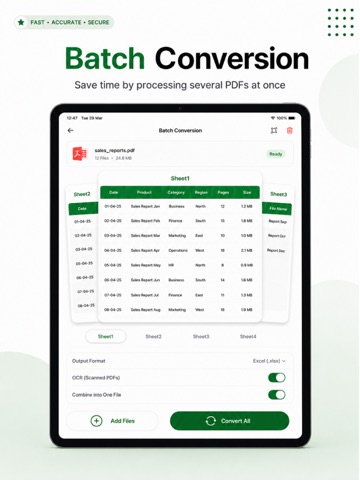
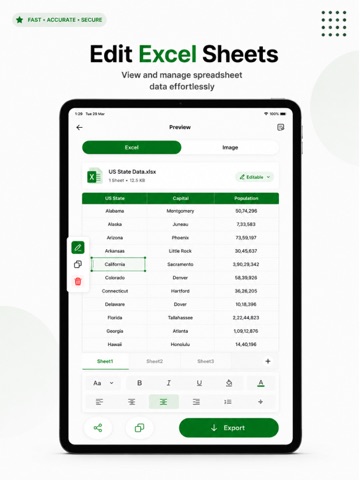
Need to extract tables and data from PDFs or images into Excel? PDF to Excel Converter makes it quick and easy to convert PDF files, scanned documents, receipts, reports, and images into fully editable Excel spreadsheets. Save time, reduce manual data entry, and organize your information more efficiently with accurate data extraction and seamless conversions. Whether you're managing financial records, business reports, research data, or everyday documents, PDF to Excel Converter helps you convert, edit, and export spreadsheet-ready files in just a few taps. WHY CHOOSE PDF TO EXCEL CONVERTER? Turn static PDF documents and images into editable Excel spreadsheets without complicated software or manual formatting. Extract tables, organize data, and create professional spreadsheets wherever you are. KEY FEATURES PDF to Excel Conversion Convert PDF documents into editable Excel spreadsheets while preserving table structure and data formatting whenever possible. Image to Excel Conversion Extract data from images, screenshots, receipts, invoices, reports, and scanned documents and easily convert them into Excel sheets. Multiple Import Options Import files directly from your device, Google Drive, or via file link for a flexible and easy workflow. Preview & Edit Before Conversion Review your files before converting. Trim content, remove unwanted pages, and customize the document to get better results. Export in Multiple Formats Save and export converted files in various formats, including: • XLSX • CSV • HTML • PDF Organize & Share Keep your files organized by renaming documents and sharing them instantly with colleagues, clients, friends, or team members. Accurate Data Extraction Advanced recognition technology helps extract tables and structured data with high accuracy, reducing errors and saving valuable time. FAST & SIMPLE WORKFLOW Upload a PDF or image from your device, Google Drive, or file link. Preview and edit the document if needed. Convert the file into an editable Excel spreadsheet. Export and save your file in your preferred format. Access, manage, and share your spreadsheets anytime. PERFECT FOR Business Professionals Convert invoices, financial reports, contracts, and business documents into editable Excel files for analysis and reporting. Students & Researchers Extract tables, charts, and structured data from study materials, reports, and research documents. Freelancers & Consultants Organize client data, invoices, records, and project documents more efficiently. Personal Use Manage budgets, receipts, personal records, and scanned documents with easy Excel conversion. PRIVACY & SECURITY Your privacy matters. Files are processed securely, and we are committed to protecting your information throughout the conversion process. WHY USERS LOVE PDF TO EXCEL CONVERTER • Fast PDF to Excel conversion • Accurate table and data extraction • Support for PDF and image conversion • Easy editing before conversion • Multiple export options • Simple and intuitive workflow • Ideal for work, study, and everyday use Make spreadsheet creation easier than ever. Convert PDFs and images into editable Excel files in seconds and streamline your workflow with PDF to Excel Converter. Download now and experience smarter data extraction and Excel conversion on the go. Privacy Policy: https://sparkly-zabaione-297b74.netlify.app/privacy-policy Terms of Use: https://sparkly-zabaione-297b74.netlify.app/terms-and-conditions
Audience growth
Ratings growth
Baseline captured. Growth appears after the crawler observes a changed rating count.
Momentum comes from crawler snapshots for the tracked storefront. “Viral growth signal” means unusually fast recent rating gains; it is an indicator, not download data.
Price tracking
Price intelligence
First snapshot captured. The trend line starts after the next crawler price observation.
- First observed Aug 21, 2026 · 3:32 AM Free
Screenshots