About this app
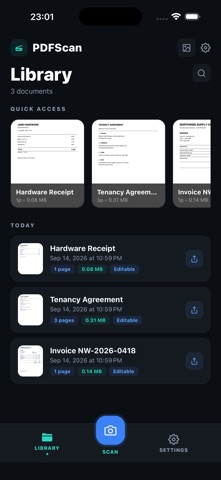
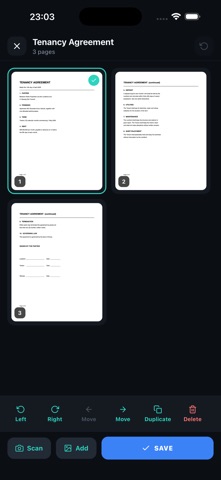
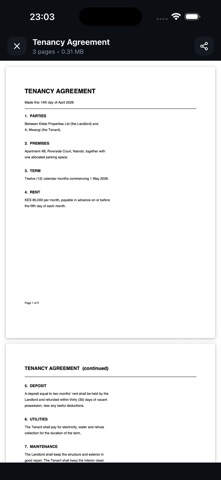
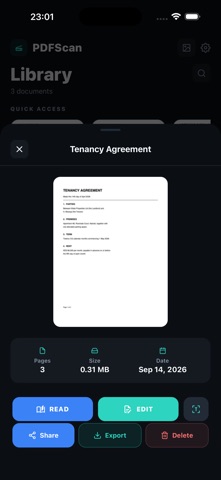
Scan anything into a clean PDF — then actually work with it. PDFScan turns your camera into a document scanner: automatic edge detection, perspective correction, and sharp output in seconds. Everything happens on your device. No account, no sign-in, nothing uploaded. SCAN • Automatic edge detection and perspective correction • Capture several pages in one pass • Import photos from your library • Low, medium and high quality presets, so files stay small enough to email EDIT PAGES • Reorder, rotate, duplicate or delete pages • Add pages by scanning or from your photos • Rename a document and rebuild the PDF • Undo while you work READ PDFs • Open any PDF, including ones sent from Files, Mail or the share sheet • Scroll and pinch to zoom • Import PDFs into your library to keep everything together EXTRACT TEXT • On-device text recognition pulls the words out of a scan • Copy the text, or share it as a .txt file • Works offline — no image ever leaves your device SHARE • Merge several documents into a single PDF • Export pages as JPEG or PNG • Send anywhere through the standard share sheet PRIVATE BY DESIGN Your documents stay in the app's own storage on your device. There is no account, no cloud sync, and nothing is uploaded for processing. FREE, WITH AN OPTIONAL UPGRADE Everything above is free. PDFScan Pro removes the ads and the small logo printed in the bottom margin of generated PDFs, available as a monthly subscription or a single one-time purchase. Nothing is taken away if you stay on the free tier. PDFScan Pro is available as a $0.99 per month auto-renewing subscription, or as a $4.99 one-time purchase. Payment is charged to your Apple ID at confirmation of purchase. The subscription renews automatically unless cancelled at least 24 hours before the end of the current period. Manage or cancel it at any time in your Apple ID settings. Terms of Use (EULA): https://www.apple.com/legal/internet-services/itunes/dev/stdeula/ Privacy Policy: https://www.notion.so/elviskirui/Privacy-Policy-for-PDFScanner-362d665fdb86800e95f9d402e4e5d974
Latest release
What’s New
• Page editor — reorder, rotate, duplicate and delete pages, then rebuild the PDF • Built-in PDF reader — open any PDF, including ones shared from Files or Mail • Import existing PDFs into your library • Merging documents now keeps full page quality instead of using a thumbnail • Fixed a bug where deleting a document could remove pages belonging to another document with a similar name • Light and dark themes now follow your device setting • Layout fixes for iPad rotation and Split View
Audience growth
Ratings growth
Baseline captured. Growth appears after the crawler observes a changed rating count.
Momentum comes from crawler snapshots for the tracked storefront. “Viral growth signal” means unusually fast recent rating gains; it is an indicator, not download data.
Price tracking
Price intelligence
First snapshot captured. The trend line starts after the next crawler price observation.
- First observed Sep 21, 2026 · 10:01 AM Free
Screenshots