About this app
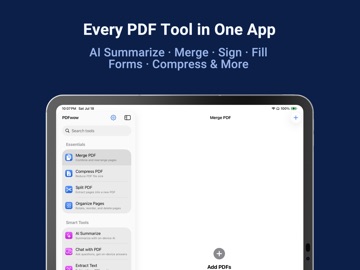
Sign a form. Shrink a file too big to email. Find out what a 40-page contract actually says. PDFwow has one simple tool for each job — and your documents never leave your iPhone or iPad. No cloud. No uploads. "I NEED TO SIGN OR FILL THIS IN" • Sign & Annotate — Sign with your finger, or type your name and get neat handwriting. Add dates and notes. Move or resize anything. • Fill Form — Tap a field and type. On a scanned form with no real fields, tap anywhere and type. Autofill can add your saved details, and lists every one so you can check them. "IT'S TOO BIG TO EMAIL" • Compress PDF — Make a PDF smaller. Text stays sharp and selectable. Need it under a limit? Pick 1, 5 or 10 MB. PDFwow gets as close as it can — and tells you if it couldn't. • Compress Photos — Shrink photos before you send them. "THE PAGES AREN'T RIGHT" • Merge PDF — Join PDFs and photos into one, then drag the pages into order. • Split PDF — Take out just the pages you need, or cut one PDF into several files at once. • Organize Pages — Rotate a sideways scan. Drag pages into order. Delete the ones you don't need. • Page Numbers — Number every page. "I NEED IT AS A PDF" — OR OUT OF ONE • Photo to PDF — Point your camera at paper and get a clean PDF. Or turn photos you already have into one. Start a scan from Control Center or by asking Siri. • Word to PDF — Turn a Word document into a PDF. See it before you save. • PDF to Word — Turn a PDF back into a document you can edit in Word, Pages or Google Docs. • PDF to Images — Save each page as a JPEG. "WHAT DOES THIS DOCUMENT ACTUALLY SAY?" • Chat with PDF — Ask a question in your own words. Answers show the page they came from. Tap it to read that part yourself. • AI Summarize — A short summary, plus the names, dates and amounts. On a receipt or invoice it pulls out the total and the line items. Tap a name, date or amount to jump to it. • Extract Text — Pull the text out of any PDF or photo, even a scan. Copy it, hear it read aloud, or translate it and save that as its own PDF. Tables copy out as CSV for a spreadsheet. Phone numbers, emails and dates can go to Contacts or Calendar. "THIS HAS PRIVATE INFORMATION IN IT" • Redact PDF — Black out anything private. The hidden text is destroyed, not just covered, so nobody can copy it back out. PDFwow can find names, emails, phone numbers, ID numbers, addresses and dates of birth, and show you each one before you export. You can always black out anything by hand. • Protect PDF — Lock a PDF with a password. • Watermark — Stamp words or your logo on every page, with a live preview. BUILT TO FIT INTO YOUR DAY Open a PDF from Mail, Files, Safari or Messages and pick your tool right there. Recents keeps recent files one tap away, and you can pin your favourites to the top. Add a Home Screen widget to jump straight into a tool you use often. Ten actions work in Shortcuts and Siri. PRIVATE BY DESIGN Everything happens on your device. Your documents are never uploaded, never sent to a server, never used to train anything. WHAT YOUR DEVICE NEEDS Signing, filling, merging, splitting, compressing, converting, scanning, text recognition and translation work on any supported iPhone or iPad. iOS 26 or iPadOS 26 adds finding emails, phone numbers, ID numbers, addresses and dates of birth to redact, plus tables you can copy as a spreadsheet. Apple Intelligence on iOS 26 adds Chat with PDF, full AI Summarize, Autofill, smart file names, and finding people's names to redact. Without it, AI Summarize still gives a Quick Summary, and you can redact by hand. Try every tool free and see your result on screen. To save or share, start your free trial — then $9.99/month or $39.99/year for unlimited exports across all 18 tools. Cancel anytime. Privacy Policy: https://fierce-inlet-63133.herokuapp.com/combine-pdf-privacy Terms of Use: https://www.apple.com/legal/internet-services/itunes/dev/stdeula/
Latest release
What’s New
• Search now understands everyday words. Try "too big", "black out", "jpg", "read aloud", "remove page" or "add a password". • New Open button on the home screen, so you can start with your document instead of choosing a tool first. • Redact PDF: a much bigger tap target on the button that chooses what to look for, and a much better look in Dark Mode. • When Smart Redact finds no readable text in a PDF — usually a photo or a scan — it now says "No Text to Scan" instead of reporting an error.
Audience growth
Ratings growth
Baseline captured. Growth appears after the crawler observes a changed rating count.
Momentum comes from crawler snapshots for the tracked storefront. “Viral growth signal” means unusually fast recent rating gains; it is an indicator, not download data.
Price tracking
Price intelligence
First snapshot captured. The trend line starts after the next crawler price observation.
- First observed Aug 7, 2026 · 6:38 AM Free
Screenshots