About this app
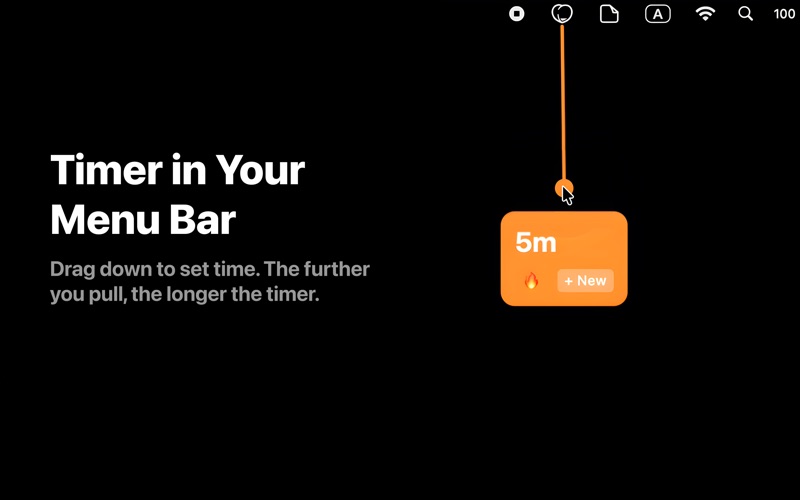
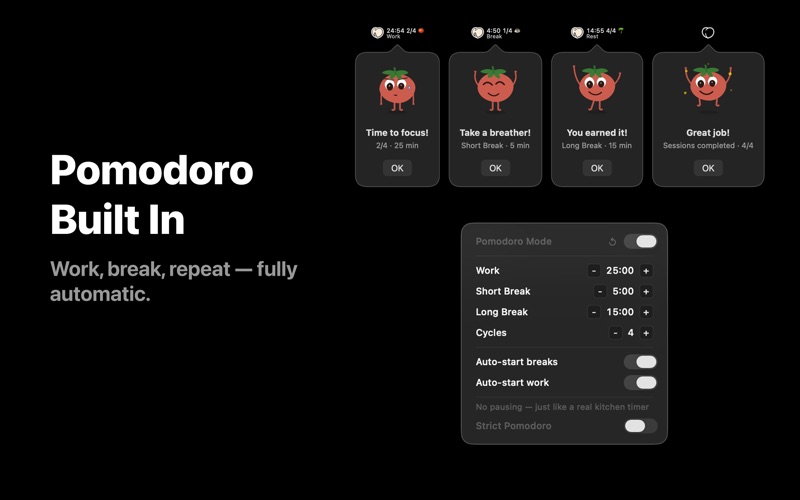
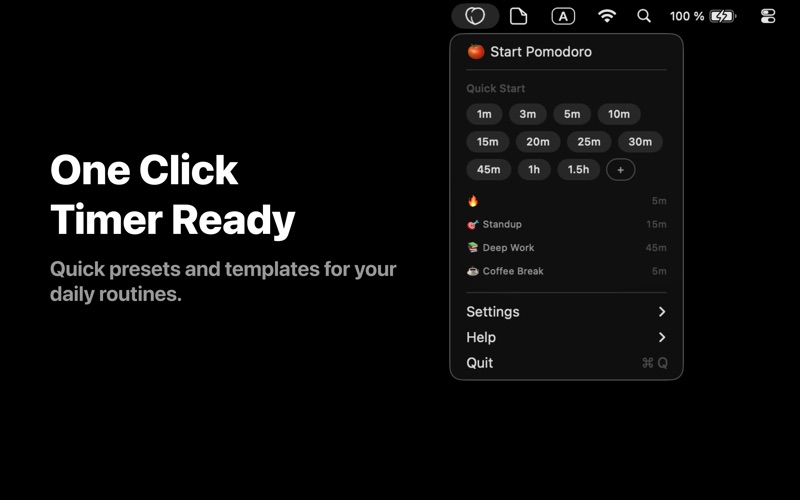
The fastest way to set a timer on your Mac — drag, click, or type. Peachy Timer lives in your menu bar and gives you multiple ways to start a timer in seconds. Drag down from the peach icon to set any duration visually, pick a quick timer with one click, or type in the exact time you need. Whatever feels natural — Peachy Timer has you covered. QUICK START TIMERS • One-click presets: 1, 3, 5, 10, 15, 20, 25, 30, 45 min, 1h, 1.5h • Tap any preset and the timer starts immediately • Need a custom time? Hit "+" and type hours, minutes, and seconds DRAG GESTURE • Drag down from the menu bar icon to set any duration • Move left or right to pick your templates • Release to start — no menus, no friction TEMPLATES & GOALS • Create named goals like "Exercise", "Reading", "Deep Work" • Assign emoji labels and fixed durations to your favorites • One tap to start your most-used timers POMODORO TIMER — FREE • Classic 25/5/15 Pomodoro technique built in • 4 work cycles, short breaks in between, long break at the end • Phases advance automatically — just start and stay focused • Strict mode prevents pauses during work to keep you on track MULTIPLE TIMERS • Run several timers at the same time • Perfect for cooking, workouts, or parallel tasks • Each timer shows its name and remaining time in the menu ALWAYS IN YOUR MENU BAR • See timer progress right in the menu bar icon • Choose from 28 icon colors across 4 palettes • Pick a progress fill style that suits you SMART ALERTS • 10 alarm sounds to choose from • Repeat once, 3x, 5x, or loop until you dismiss • Visual completion panel with animations FREE & PRO • Free: Up to 3 simultaneous timers, all quick presets, basic Pomodoro, and core features • Pro: Unlimited timers, 28 colors, 10 sounds, all repeat modes, full template management • Pro Pomodoro: Customize work time (1–90 min), breaks (1–30 / 5–60 min), cycles (1–8), toggle auto-start and strict mode Perfect for: • Pomodoro technique and deep focus sessions • Brewing the perfect cup of coffee or tea • Timing your cooking and baking • Workout intervals and rest periods • Quick reminders throughout your day Download Peachy Timer and start your first timer in under a second. PRIVACY & SUPPORT Privacy Policy: https://peachytimer.com/privacy Terms of Use: https://peachytimer.com/terms Support: support@peachytimer.com
Latest release
What’s New
What's New Pomodoro Timer Full Pomodoro support is here. Work, short break, long break — all phases flow automatically. Strict mode keeps you focused by preventing pauses during work sessions. Available for free with the classic 25/5/15 setup. Pro unlocks full customization: adjust work time, break durations, number of cycles, auto-start, and strict mode. Quick Start A new Quick Start section lets you launch timers instantly. Pick from 11 presets — 1, 3, 5, 10, 15, 20, 25, 30, 45 min, 1h, or 1.5h — with a single click. Or hit “+” to type your own time. UI & Experience Improvements - Cleaner, more polished interface throughout the app - Smoother timer creation flow - Better menu bar layout and navigation Bug Fixes - Fixed minor visual glitches and edge cases - Improved overall stability and performance
Audience growth
Ratings growth
Baseline captured. Growth appears after the crawler observes a changed rating count.
Momentum comes from crawler snapshots for the tracked storefront. “Viral growth signal” means unusually fast recent rating gains; it is an indicator, not download data.
Price tracking
Price intelligence
First snapshot captured. The trend line starts after the next crawler price observation.
- First observed Aug 8, 2026 · 1:33 AM Free
Screenshots