About this app
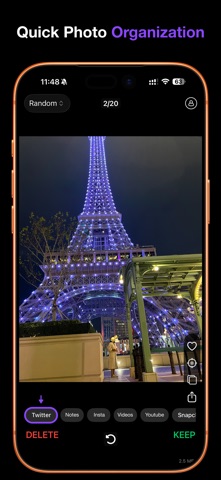
Your camera roll is out of control. Snapswipe fixes that in minutes. Photo Cleaner: Snapswipe turns the overwhelming task of clearing thousands of photos into something weirdly satisfying. Swipe left to delete, swipe right to keep. One photo at a time. That's the whole app — and that's exactly why it works. SWIPE TO DECIDE No menus. No bulk-select grids. No second-guessing. Snapswipe puts one photo in front of you and asks one question: keep or delete? A swipe left sends it to the trash. A swipe right saves it. The gesture feels instant and natural — like flipping through a stack of prints, but faster. Most people clear hundreds of photos in a single session without it feeling like a chore. BUILT FOR SPEED Snapswipe is engineered to keep up with you. Photos load instantly, animations are smooth, and there's nothing in the way between you and the next decision. No complex menus, no confusing options, no features you didn't ask for. Just swipe, and you're done. PERFECT FOR EVERY SITUATION After a photoshoot or a trip, you come home with 300 nearly-identical shots. Snapswipe gets you through them fast, keeping only the best. Post-event cleanups — birthday parties, concerts, holidays — take minutes instead of an afternoon. And for daily maintenance, it's the quickest way to clear out screenshots, downloads, and blurry accidentals before they pile up. Every swipe frees up real storage space on your iPhone. YOUR PRIVACY, GUARANTEED All photo processing happens entirely on your device. Snapswipe never uploads, accesses, or transmits your photos anywhere. Your camera roll stays yours — private, local, and fully under your control. Ready to finally clear that camera roll? Download Photo Cleaner: Snapswipe and start swiping. Privacy Policy: https://docs.google.com/document/d/1TvWLLtTb4HwWrMZR_tINhFkyTdBxWvJcfarwTK6cnUg/edit?usp=sharing Terms of Use https://docs.google.com/document/d/1YaogN-02CTtYQeV2oivmc1u1Xohb9ZTMD2iA0P7dil8/edit?usp=sharing
Latest release
What’s New
Fix minor bugs.
Audience growth
Ratings growth
Baseline captured. Growth appears after the crawler observes a changed rating count.
Momentum comes from crawler snapshots for the tracked storefront. “Viral growth signal” means unusually fast recent rating gains; it is an indicator, not download data.
Price tracking
Price intelligence
First snapshot captured. The trend line starts after the next crawler price observation.
- First observed Aug 18, 2026 · 10:11 AM Free
Screenshots