About this app
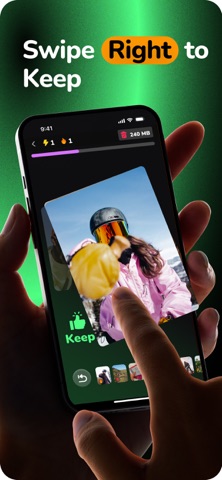
Clean Your Photo Library, One Swipe at a Time Declutter your camera roll while having fun. No more endless scrolling, complex folders, or slow manual sorting—Swipe Photo Cleaner Fast: Hawt turns photo cleanup into a fast, satisfying experience you’ll actually enjoy. Sorting Photos Just Got Fun. Who said photo sorting has to be boring? With Hawt, it’s as easy and addictive as swiping on Tinder. Designed for speed, simplicity, and a little sass, it helps you sort through your photo gallery in minutes not hours. Whether you're organizing vacation images, deleting duplicates, or selecting that perfect favorite selfie, Hawt makes it fun to take control of your phone's photo library. How It Works Swipe left to delete blurry or unwanted shots Swipe right to save the good ones Swipe up to mark it as Hawt – your best photos ready for Instagram, Stories, or profile pics That’s it. No messy folders. No decision fatigue. Just pure, swipe-based satisfaction. Free Up Space Instantly Your phone is filled with useless images, screenshots, and videos taking up valuable storage. Hawt helps you clean smart and reclaim precious space—without losing your best memories. Whether you’re running out of storage or just want to tidy up, it’s the easiest way to organize your camera roll. Discover Your Hidden Gems Some of your best moments are buried under digital clutter. Hawt brings them back. Sort, swipe, and resurface your best favorites in one neat place—your personal Hawt Collection. Perfect for sharing on social or just admiring how good you look. Simple. Fast. Satisfying. No tutorials. No clutter. Just open the app and swipe like a pro. Whether you’re procrastinating or on a mission to clean, Hawt turns organizing into pure fun. Great for Instagram creators, content lovers, and anyone who values an easy, beautiful gallery. Why Use Swipe Photo Cleaner Fast: Hawt? ; Photo deleter Easy to use: Intuitive swipes to clean and organize Pick your favorite photos: Swipe up to collect your favorites and best Free up space: Quickly remove junk and save storage 100% private: No cloud backup. Everything stays on your phone No ads. No limits. Just clean your gallery in peace Give Your Gallery a Glow-Up Take your photo game to the next level. Sort, organize, delete, and highlight your best images—all in one smooth swipe. Download Swipe Photo Cleaner Fast: Hawt now and discover how fun and easy it is to clean your camera roll like a pro. Privacy Policy : https://www.notion.so/Privacy-Policy-1fa1c78cfa688049a8dec5206b2bb797?pvs=4 Terms of use : https://www.apple.com/legal/internet-services/itunes/dev/stdeula/
Latest release
What’s New
We made Snapswipe much smoother and better with UI and performance enhancements. Happy Swiping!
Audience growth
Ratings growth
Baseline captured. Growth appears after the crawler observes a changed rating count.
Momentum comes from crawler snapshots for the tracked storefront. “Viral growth signal” means unusually fast recent rating gains; it is an indicator, not download data.
Price tracking
Price intelligence
First snapshot captured. The trend line starts after the next crawler price observation.
- First observed Sep 4, 2026 · 4:59 AM Free
Screenshots