About this app
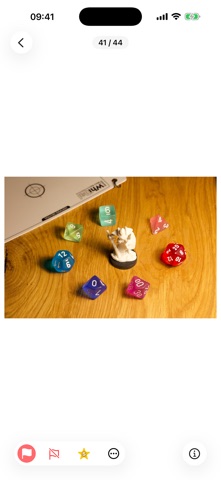
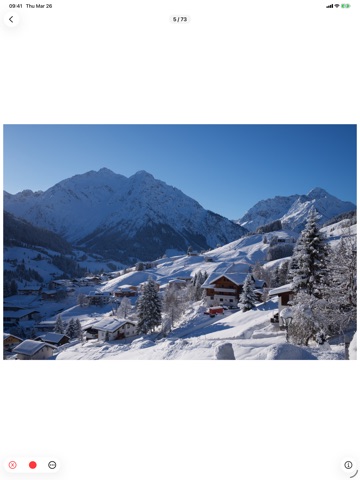
Cull RAW photos on your iPhone or iPad -- no cloud, no account, no waiting. Photo Triager lets you pick your keepers and rejects in the field, so you only bring the best shots back to your desktop editor. FAST TRIAGE WORKFLOW Swipe through full-size RAW previews. Reject, pick, rate with 1-5 stars, and apply color labels -- all with a single tap. Pinch to zoom up to 10x to check focus and detail. XMP SIDECAR OUTPUT Every decision is saved as a standard XMP sidecar file right next to your RAW files. Open the folder in darktable or Lightroom and your ratings, flags, and color labels are already there. No import, no sync, no extra steps. - Darktable: multi-select color labels, reject flags - Lightroom: pick/reject flags (Classic >= 13.2), single-select color labels, star ratings GALLERY WITH SMART FILTERS Browse your photos in an adaptive thumbnail grid with badge overlays showing your triage decisions. Filter by rating, flag, or color label with presets (Untriaged, Rejected, Picked) or build custom filter rules. EXIF METADATA View camera model, lens, focal length, aperture, shutter speed, ISO, capture date, file size, and dimensions for every photo. SUPPORTED CAMERAS Sony (ARW), Canon (CR3, CR2), Nikon (NEF), Fujifilm (RAF), Panasonic (RW2) -- all iOS-compatible models. GENEROUS FREE TIER - 1,000 welcome gift actions - 50 free actions every day - Photo Pack: 500 actions -- $0.99 - 30-Day Pass: unlimited actions for 30 days -- $2.99 (no auto-renewal) - Re-editing the same photo within 90 days is always free - Browsing and filtering never cost an action PRIVACY FIRST No analytics. No tracking. No data collection. Your photos never leave your device.
Latest release
What’s New
- Faster gallery loading for iCloud folders — thumbnails appear in order from top to bottom. - Filtered gallery shows loading progress when the app launches with an active filter. - Triage title bar shows all active triage statuses (reject, star ratings, color labels). - Photo Pack balance persists across app reinstall. - Smoother transitions between gallery and triage views. - Gallery badges no longer pop in after thumbnails. - Various stability improvements.
Audience growth
Ratings growth
Baseline captured. Growth appears after the crawler observes a changed rating count.
Momentum comes from crawler snapshots for the tracked storefront. “Viral growth signal” means unusually fast recent rating gains; it is an indicator, not download data.
Price tracking
Price intelligence
First snapshot captured. The trend line starts after the next crawler price observation.
- First observed Sep 4, 2026 · 5:57 AM Free
Screenshots