About this app
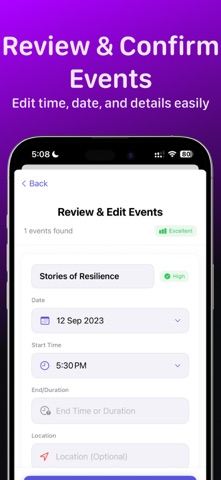
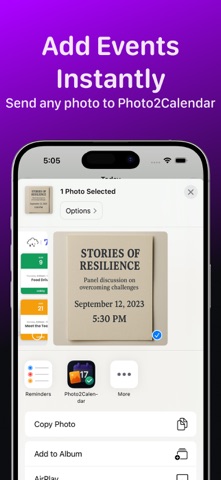
Photo2Calendar turns your schedule photos and screenshots into real calendar events in seconds—no more retyping. Simply snap a photo, upload an image, or drop in a screenshot, and our AI instantly extracts event titles, dates, times, locations, and notes. Review, edit if needed, and save everything directly to your Calendar with one tap. Key Features • AI-powered extraction: Detects event details including titles, start/end times, locations, and notes. • One-tap saving: Add extracted events straight to your default Calendar. • Flexible input: Works with photos, screenshots, timetables, whiteboards, and flyers. • Drag & Drop support on iPhone and iPad. • Retry & validation: Guided re-analysis if needed, with clear editing before saving. • History: Keep a record of processed images and events. • Privacy first: Images are analyzed only for event data and not stored permanently. Best For • Class timetables and study schedules • Event flyers and posters • Meeting notes and whiteboard snapshots • Work shifts and duty rosters • Chat screenshots with date/time info Subscription Required Photo2Calendar is free to download. A Pro subscription is required to unlock unlimited image-to-calendar processing. Flexible plans with optional free trial are available.
Latest release
What’s New
Bug fixes
Audience growth
Ratings growth
Baseline captured. Growth appears after the crawler observes a changed rating count.
Momentum comes from crawler snapshots for the tracked storefront. “Viral growth signal” means unusually fast recent rating gains; it is an indicator, not download data.
Price tracking
Price intelligence
First snapshot captured. The trend line starts after the next crawler price observation.
- First observed Aug 21, 2026 · 8:16 AM Free
Screenshots