About this app
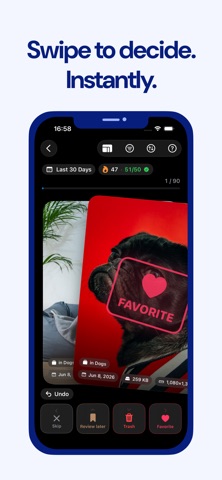
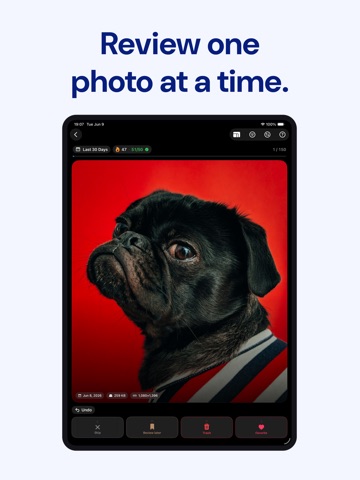
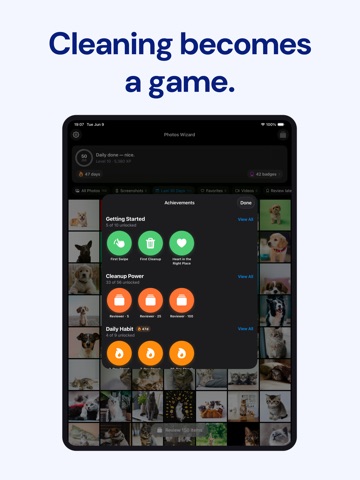
Clean up your camera roll one swipe at a time. Game-style review, daily streaks, and bulk power tools — turn the chore you skip into something you actually finish. A PHOTOS APP YOU'LL OPEN ON PURPOSE Photos Wizard turns the chore of cleaning your library into something you'll come back to. Swipe through your photos like a deck of cards, assign one action per swipe, and watch the backlog shrink. Streaks, daily quotas, and badges keep the momentum going. THE SWIPE DECK • One photo at a time, full-screen — no grid to get lost in. • Bind any action to any direction: Delete, Favorite, Move to Album, Hide, Share, Review Later, or Skip. • Reassign your bindings anytime from the (?) menu — your deck, your rules. • Smart filters: Screenshots, Large Videos, Hidden, Favorites, by Album. POWER TOOLS THE NATIVE APP LACKS • Bulk move into custom albums in a single pass. • Filter by what's actually wasting space — screenshots, large videos, duplicates. • Per-window decks on Mac and Vision Pro: open two libraries side by side and sort them independently. • Multi-window everywhere your device supports it. A DAILY HABIT, NOT A ONE-OFF • Daily quota with a confetti finish when you cross it. • Streak counter — clean a little every day instead of a panicked once-a-year purge. • XP and badges for milestones you actually care about (first 100 cleaned, first album sorted, longest streak). HOW IT WORKS 1. Grant Photos access — we never upload your library; everything happens on-device. 2. Pick a filter (or just start with All Photos). 3. Swipe. Right to favorite, left to delete, up to add to album — or rebind any of them. 4. Hit your daily quota, keep your streak, and watch the deck shrink. PERFECT FOR • Anyone whose camera roll has crossed 10,000 photos and stopped feeling browsable. • People who screenshot too much and never go back to clean up. • Folks who've tried "delete a photo a day" challenges and bounced off the friction. • Power users who want bulk album moves without dragging into the native Photos app. PRICING • Free forever for the core swipe loop — clean up to 100 photos per day. • Pro unlocks unlimited daily swipes, vertical swipe actions, and the Review Later queue. PRIVACY Your photos never leave your device. Photos Wizard talks to Apple's Photos library locally — no cloud upload, no third-party photo storage. Stop scrolling past 47,000 photos every time you open the camera. Swipe. Sort. Done. --- Privacy Policy: https://photoswizard.lpp.pw/privacy Terms of Service: https://photoswizard.lpp.pw/terms Support: contact@spatial-ai-labs.com
Latest release
What’s New
Snappier swipes, new home filter & sort menus, persistent swipe bindings, plus polish and bug fixes.
Audience growth
Ratings growth
Baseline captured. Growth appears after the crawler observes a changed rating count.
Momentum comes from crawler snapshots for the tracked storefront. “Viral growth signal” means unusually fast recent rating gains; it is an indicator, not download data.
Price tracking
Price intelligence
First snapshot captured. The trend line starts after the next crawler price observation.
- First observed Aug 5, 2026 · 10:42 PM Free
Screenshots