About this app
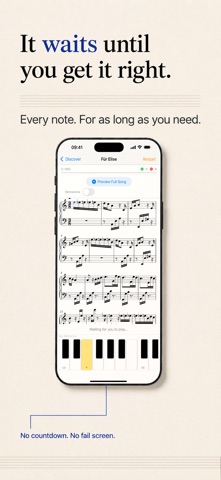
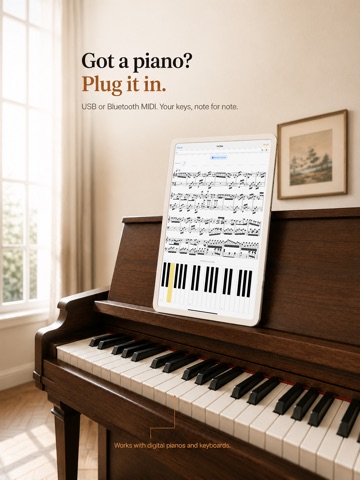
PianoAI is your personal piano teacher. Follow note-by-note guidance that waits for you, get instant feedback on every note and rhythm, and build a daily practice habit — from your first note to your first full song. TWO WAYS TO PLAY • Practice Mode — notes light up as you go, and PianoAI waits for the right one before moving on, catching wrong notes and timing slips in real time so you never practice mistakes. Choose your own tempo and use the built-in metronome. • Rhythm Mode — turn your phone sideways and the notes fall in time with the music. Hit them as they land to score points: a fast, fun way to build timing, reflexes, and sight-reading. PLAY YOUR WAY • On-screen keyboard — start learning with nothing but your iPhone or iPad. • MIDI keyboard support — connect a digital piano via USB or Bluetooth for note-perfect tracking. A LIBRARY THAT GROWS WITH YOU • Curated songs with composer, arranger, and difficulty levels — from beginner melodies to advanced arrangements. • A daily practice plan that always tells you what to work on next. PROGRESS THAT KEEPS YOU MOTIVATED • Daily practice goals, weekly streaks, total minutes, and accuracy trends — watch yourself improve session after session. PIANOAI PLUS Unlock the full song library and all features with PianoAI Plus, an auto-renewing subscription available as a monthly or annual plan, each with a 7-day free trial. The current price for your region is shown in the app before you subscribe. Family Sharing is supported. Payment is charged to your Apple Account at confirmation of purchase, and the subscription renews automatically unless cancelled at least 24 hours before the end of the current period. You can manage or cancel your subscription in your account settings at any time. Terms of Use: https://pianoai.app/terms Privacy Policy: https://pianoai.app/privacy Support: https://pianoai.app/support Whether you're sitting down at a piano for the first time or coming back after years away, PianoAI makes practice focused, measurable, and fun.
Latest release
What’s New
fix error and updates.
Audience growth
Ratings growth
Baseline captured. Growth appears after the crawler observes a changed rating count.
Momentum comes from crawler snapshots for the tracked storefront. “Viral growth signal” means unusually fast recent rating gains; it is an indicator, not download data.
Price tracking
Price intelligence
First snapshot captured. The trend line starts after the next crawler price observation.
- First observed Aug 19, 2026 · 8:39 AM Free
Screenshots