About this app
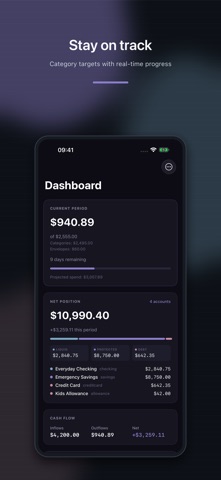
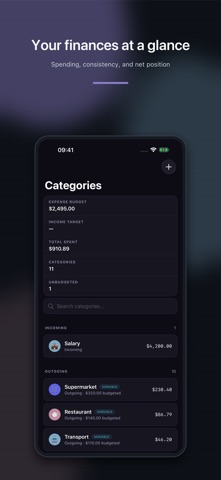
PiggyPulse is a personal budget tracker that works the way you do — not on fixed monthly cycles, but on custom periods that match your real life. Whether you get paid bi-weekly, want to track spending per project, or simply prefer a different rhythm, PiggyPulse lets you define your own budget periods and track every euro, dollar, or pound against them. TRACK YOUR SPENDING Record income, expenses, and transfers between accounts Categorize transactions with custom categories and icons Assign vendors to track where your money goes Filter and search across all your transactions CUSTOM BUDGET PERIODS Create periods of any length — weekly, bi-weekly, monthly, or custom Set up auto-creation schedules so periods generate automatically Compare spending consistency across periods BUDGET PLANNING Assign budgets to categories Track spending against limits with visual progress bars See projected spending pace and remaining budget at a glance MULTIPLE ACCOUNTS Manage checking, savings, credit cards, and allowance accounts View net position across all accounts Track balance changes per period PRIVACY FIRST No bank connections — you control what data goes in No analytics or tracking No ads Your data is encrypted when stored Your data is stored in Europe Export or delete your data anytime BUILT FOR YOU Dark themes designed for comfortable daily use Custom period selector accessible from every screen Pull-to-refresh and swipe actions throughout Face ID / biometric authentication Push notifications for budget alerts PiggyPulse helps you track your money manually, privately, and on your own schedule.
Latest release
What’s New
Added translations, monitoring, and improvements to App Store screenshot support.
Audience growth
Ratings growth
Baseline captured. Growth appears after the crawler observes a changed rating count.
Momentum comes from crawler snapshots for the tracked storefront. “Viral growth signal” means unusually fast recent rating gains; it is an indicator, not download data.
Price tracking
Price intelligence
First snapshot captured. The trend line starts after the next crawler price observation.
- First observed Aug 19, 2026 · 3:16 PM Free
Screenshots