About this app
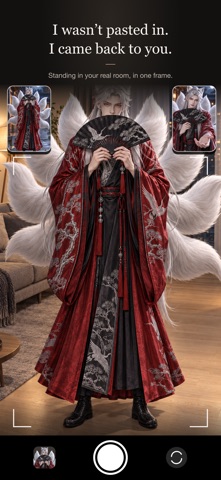
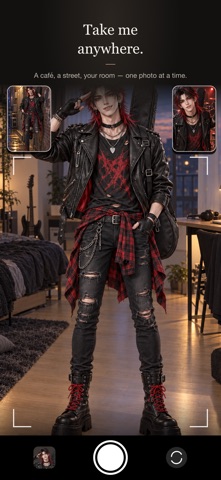
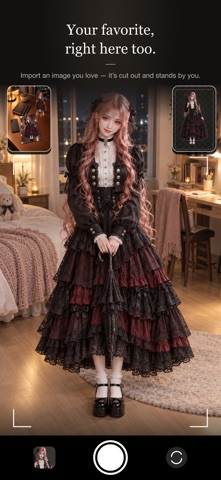
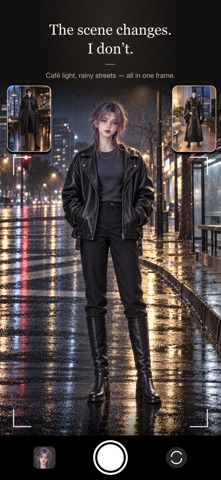
Take a photo with your fave that feels like you're sharing the same space. HOW IT WORKS 1. Pick a character: choose one of the built-in original anime characters, or import your own image from Photos. 2. Place them: point the rear camera at the floor and tap. Your character stands on that spot. 3. Shoot together: frame the shot and press the shutter, or flip to the front camera for a selfie together. HIGHLIGHTS • Stays on the floor: move your phone and your character stays put, looking bigger up close and smaller from far away. • Shadows underfoot: a shadow on the floor makes your character feel grounded in the scene. • Matches the light around you: brightness and color tone adjust to your surroundings so everything blends into one photo. • Step in front: in selfie mode, you can stand in front of your character. • Use your own images: automatic background removal, plus an edge touch-up tool for a clean cutout. • Available in 29 languages. PRIVACY Everything is processed on your device. Camera frames and imported images are never uploaded. No account, no ads, no analytics. PLEASE NOTE Only import images you have the right to use, such as photos you took yourself. Questions: conyleeyn@daum.net
Latest release
What’s New
New in this update: • Save as photocard: after you take a photo, tap Photocard in the “Photo | Photocard” switch below it to save a 55×85 mm card with a white border. The small signature in the corner can be turned off. • Shots with my fave: photos, photocards and videos you save or share now line up at the top of Characters. Tap one and choose “Shoot again with this fave” to jump straight back in. Only small previews are kept, on this device. • Swipe down without saving and you’ll first be asked “Close without saving?”, so a shot never slips away by accident. • Full-body timer shots: when the self-timer catches you head to toe on the front camera, your fave stands at their real height on the same floor as you, and lines up once more just before the countdown ends. • The Mood group now comes first in Characters, and new installs open straight into selfie mode. • Other fixes: clearer wording on the camera access screen, button labels no longer cut off on smaller screens, and your fave no longer sometimes looks darker after a brief stutter.
Audience growth
Ratings growth
Baseline captured. Growth appears after the crawler observes a changed rating count.
Momentum comes from crawler snapshots for the tracked storefront. “Viral growth signal” means unusually fast recent rating gains; it is an indicator, not download data.
Price tracking
Price intelligence
First snapshot captured. The trend line starts after the next crawler price observation.
- First observed Oct 6, 2026 · 2:11 AM Free
Screenshots