About this app
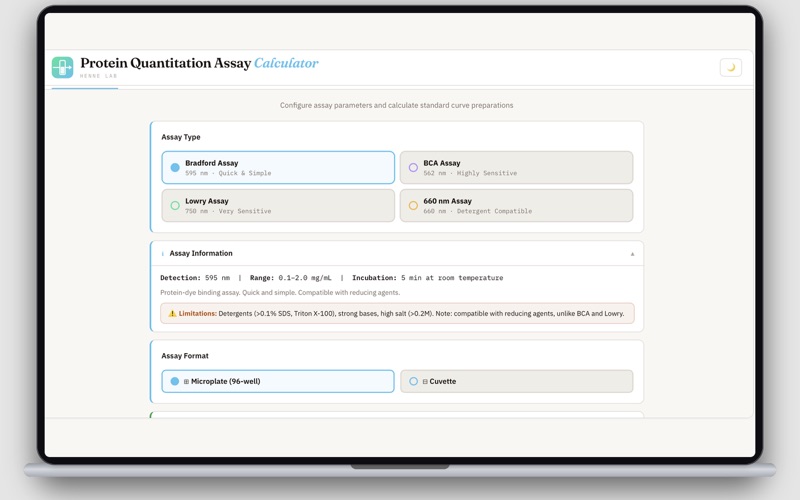
Protein Quantitation Assay Calculator is a laboratory planning tool that helps researchers, students, and laboratory professionals prepare protein quantitation assays quickly and accurately. Instead of manually calculating dilutions and organizing plate layouts, the app automates preparation steps so you can focus on your experiment. The app supports preparation workflows for four commonly used colorimetric protein assays and generates the information needed before running your assay. Features • Calculate dilution volumes for working stock preparation • Generate standard curve dilution and pipetting instructions • Create an interactive 96-well plate layout • Assign standards and unknown samples with replicate tracking • Estimate total reagent requirements • Export a formatted laboratory protocol (.txt) • Export experiment data (.csv) • Simple, intuitive interface for fast experiment planning Unknown Sample Management Assign unknown samples alongside standards with built-in replicate tracking. • Enter the number of unknown samples and desired replicates • Automatically fills standards first, then places unknowns into remaining wells • Manually reassign wells using an interactive plate editor • Color-coded visualization separates standards from unknown samples • Warnings appear when replicate assignments exceed the expected count Important Information This application is a laboratory preparation and planning tool. It helps prepare: • Working stock dilutions • Standard curve setup • Plate layouts • Reagent calculations It does not: • Read absorbance values • Calculate protein concentrations from unknown samples • Perform linear regression • Generate fitted standard curves • Replace laboratory analysis software
Audience growth
Ratings growth
Baseline captured. Growth appears after the crawler observes a changed rating count.
Momentum comes from crawler snapshots for the tracked storefront. “Viral growth signal” means unusually fast recent rating gains; it is an indicator, not download data.
Price tracking
Price intelligence
First snapshot captured. The trend line starts after the next crawler price observation.
- First observed Oct 6, 2026 · 11:52 PM Free
Screenshots