About this app
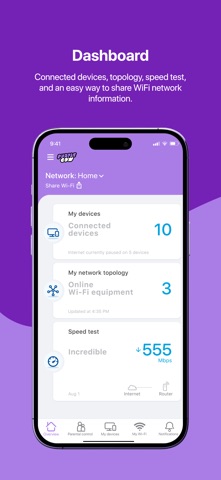
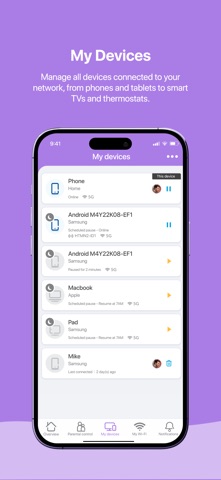
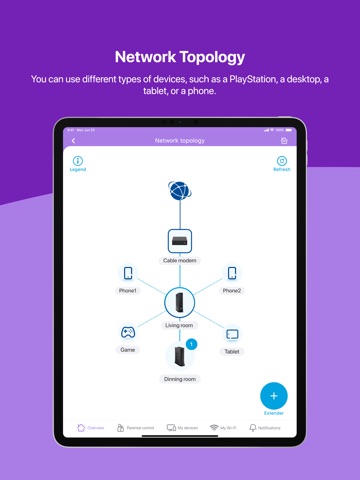
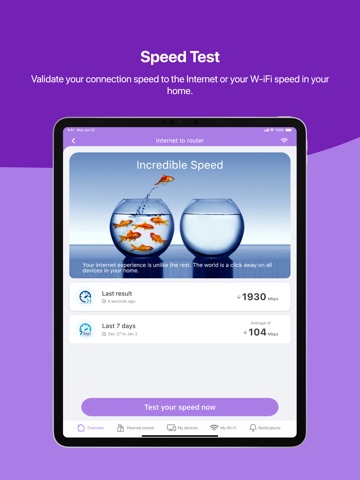
The Purple Cow Wi-Fi app lets you quickly setup and easily manage your Purple Cow Wi-Fi network equipment. Use the app for quick insights to get the most out of your internet connection and wireless network. Experience seamless connectivity with our real-time mesh Wi-Fi solution that delivers uninterrupted speed and coverage throughout your home. The Purple Cow Wi-Fi network is self-optimizing against interference in real time to avoid disruptions and ensure optimal performance. Key Features: Dashboard - View connected devices, topology, speed test results, and get an easy way to share your Wi-Fi network Network Topology - See different types of devices such as smartphones, desktops, tablets, and more Speed Test - Validate your connection speed to the internet or your Wi-Fi speed in your home Parental Controls - Set up user profiles and assign devices to users, schedule multiple pauses during specific hours Manage Multiple Locations - Have a home, cottage, and office? No matter where you are, you can manage all from the same app My Devices - Manage all devices connected to your network, from phones and tablets to smart TVs and gaming devices My Wi-Fi - Easily change the password or share it with your guests Notifications - Notify you of potential performance and security issues and guide you to the resolution Simple Setup Process: The app guides you through setup including scanning your equipment label, confirming your MAC address, selecting home layout (apartment/townhouse/house, square/rectangle shape, number of floors, total size), connecting coax cable, powering on your device, checking LED status, and setting up your Wi-Fi name and password.
Latest release
What’s New
– Multiple Admin Support: You can now add multiple admin to help manage and monitor the network. Invite trusted family or team member to manage your network from their account. - This release introduces key enhancements and resolves navigation issues.
Audience growth
Ratings growth
Baseline captured. Growth appears after the crawler observes a changed rating count.
Momentum comes from crawler snapshots for the tracked storefront. “Viral growth signal” means unusually fast recent rating gains; it is an indicator, not download data.
Price tracking
Price intelligence
First snapshot captured. The trend line starts after the next crawler price observation.
- First observed Aug 19, 2026 · 9:03 AM Free
Screenshots